 Bliss HQ
Referral partners
Know who sends you work, and keep them sending.
Find new referral partners with email workflows that follow up for you, then track every CPA, attorney, banker and client who refers business: what they send, what you send back, and when to check in next.
Part of the CRM, included in every plan.
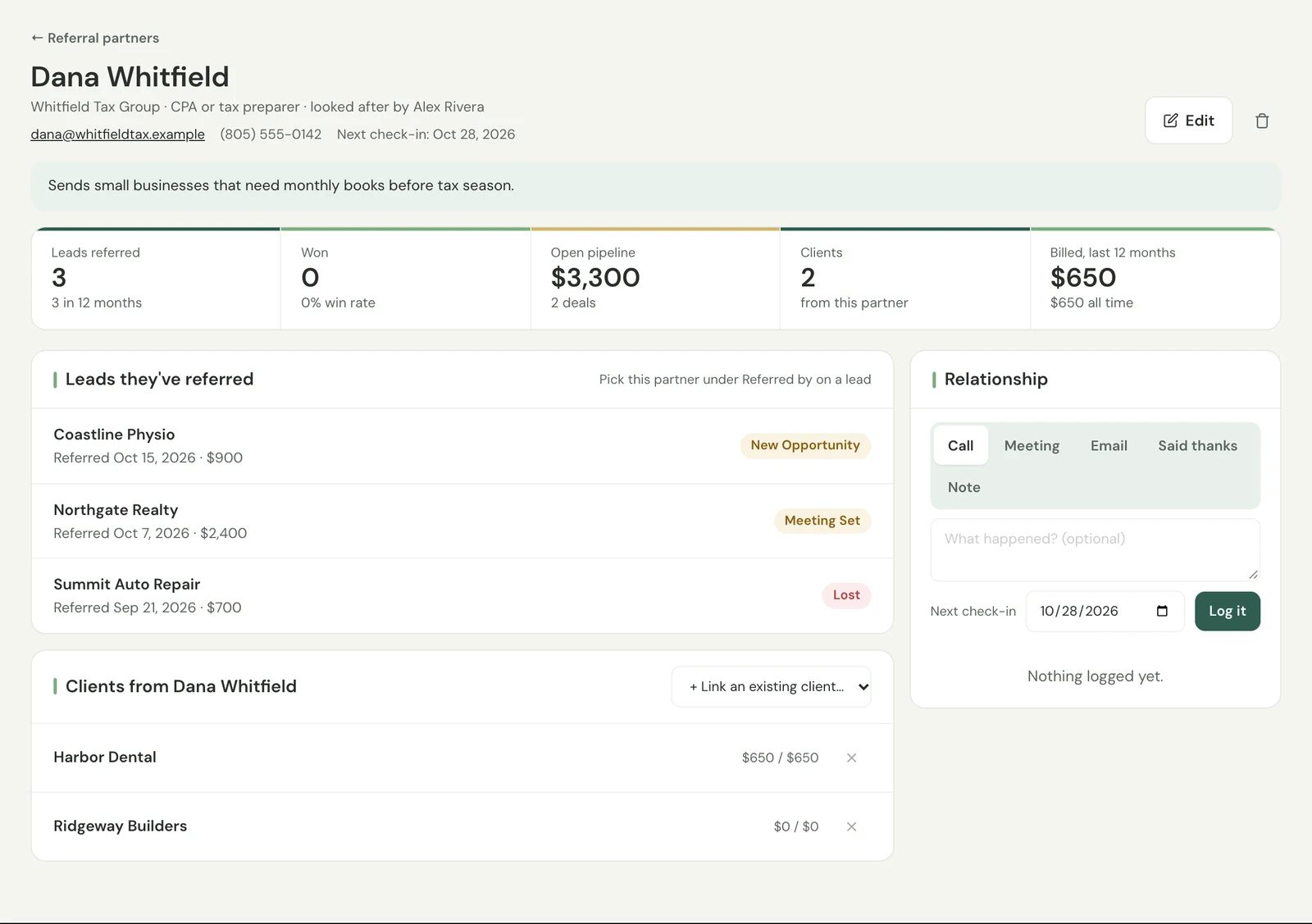
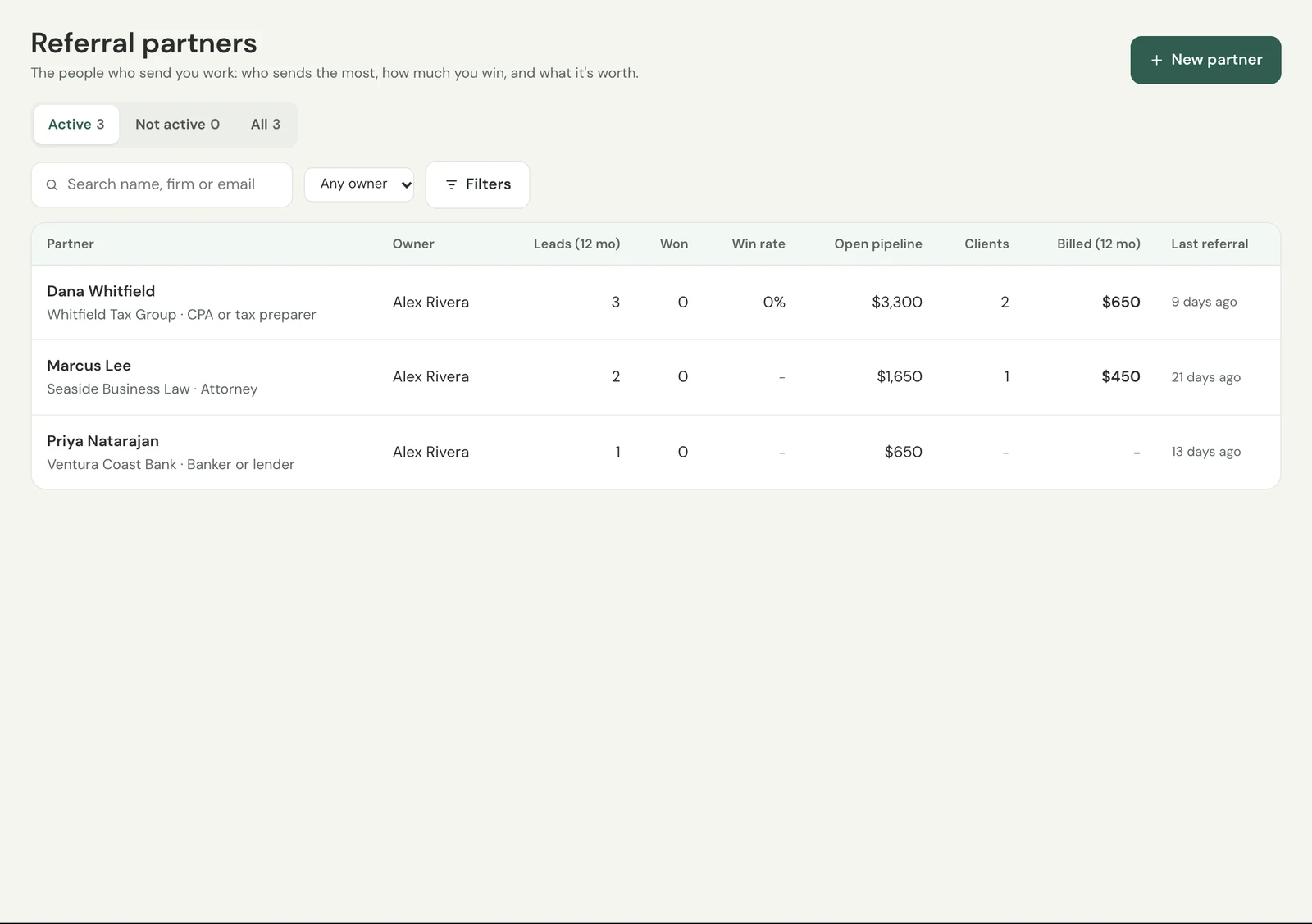
One partner's scorecard: leads referred, wins, pipeline, clients and fees
What you get
From first email to a partner who sends you clients.
Email workflows for outreach
A ready-made CPA referral call sequence that waits from the last action, follows up differently when they open or don't, and stops when they reply.
Know where everyone is
See who's in a workflow, their next step, who opened an email and who finished, right on the partner list.
Two-way referral ledger
What each partner sent you and what you sent them, with a one-click introduction email when you refer work their way.
Tiers and quiet nudges
Prospective, active, quiet and champion partners at a glance, plus a reminder when someone has gone quiet.
Repeating check-ins
Set a check-in every 30, 60 or 90 days. Logging a call or meeting moves the next one forward on its own.
Full contact details
Each partner's contacts, office and mobile numbers, address, website and LinkedIn, with click-to-call and click-to-email.
A closer look
How referral partners works in Bliss HQ.
Partner scorecard
Every number for a partner, on one page.
Open a partner to see leads referred in the last 12 months, wins and win rate, the open pipeline and its value, the clients they brought you and fees billed. Each referred lead is listed with its date, value and current stage.
- Active and Not active lists, searchable by name, firm or email
- Filter by the team member who owns the relationship
- Each lead shows its stage, like Meeting Set, Won or Lost
- Link an existing client to a partner in one click
- Sort by fees billed, leads, wins, latest referral or quietest
Thank you, on time
Every won referral gets a thank-you task.
When a lead with a referral partner is won, the person who looks after that partner gets a task to say thanks, due two days later. Log the thank-you on the partner and you always know when you last said it.
- Thank-you task due two days after the win
- Log calls, meetings, emails, thank-yous and notes
- Set the next check-in date as you log
- Check-ins show up in My Week
Never go quiet
A Monday nudge before a partner goes cold.
If a partner has sent nothing in 90 days, nobody has checked in for 30 and no check-in is planned, the person who looks after them gets a reminder on Monday, so you can reach out before the relationship fades.
- Quiet after 90 days without a referral
- Only if nobody has checked in for 30 days
- Sent to the partner's owner, not the whole team
- Logging a call, meeting, email or thank-you resets the clock
Built into the pipeline
Referred by, on every lead.
Choose the partner in a lead's Referred by field and it counts toward their numbers from then on. When the lead is won and converted, the new client stays linked to the partner, so the fees you bill count too.
- Referral leads score higher in lead scoring
- Lost leads still count toward the partner's history
- Partner types: CPA, attorney, banker, advisor and more
- Stage automations still run on referred deals
- Imported leads link to partners from a Referred by column
How it works
Three steps, then it runs.
Add partners
CPAs, attorneys, bankers, advisors, clients and more, each with an owner on your team.
Start the conversation
Add prospects to an email workflow. It sends, follows up and hands you a call task when someone shows interest.
Stay in touch
Thank-you tasks, repeating check-ins and quiet-partner nudges keep referrals coming both ways.
Part of one system
Connected to the rest of your firm.
Partners live inside the CRM: referred leads move through your pipeline and proposals, won referrals become clients whose fees count toward the partner, and outreach emails go out with your own signature and reply address.
From the blog: How to get bookkeeping clients from CPA referrals (with email templates)
Questions about referral partners
What kinds of partners can I track?
CPAs and tax preparers, attorneys, bankers and lenders, financial advisors, insurance agents, business coaches, current clients and anyone else who refers work.
Do workflow emails stop when a partner replies?
Yes. When the reply reaches a mailbox you've connected with Gmail or Outlook, the workflow stops for that partner. It also stops when you log a call or meeting, when they become an active partner, or if they unsubscribe.
Can I track referral fees?
Yes. Set a percent of first-year fees or a flat amount per new client, and Bliss HQ works out what you owe from the invoices you send. Check that any fee arrangement fits the partner's professional rules.
Who gets the reminders?
The person on your team who looks after that partner.
Can I see a partner's referrals over time?
Yes. Each partner shows leads referred in the last 12 months and all time, with the date each one came in.
Can one person look after several partners?
Yes. Each partner has an owner on your team, and you can filter the list by owner.
What if a partner stops referring?
Mark them Not active. Their history stays, and they no longer appear in the active list or in reminders.
Try referral partners on your own clients.
30 days free, no card. Every feature included, with unlimited staff.