 Bliss HQ
Proposals & e-sign
Proposals clients sign the same day.
Price work as a fixed fee, itemized lines or both, preview exactly what the client will see, and get an e-signature backed by a full certificate of completion. One click turns the signed fees into billing.
E-signature and certificate included. No separate proposal or e-signature tool.
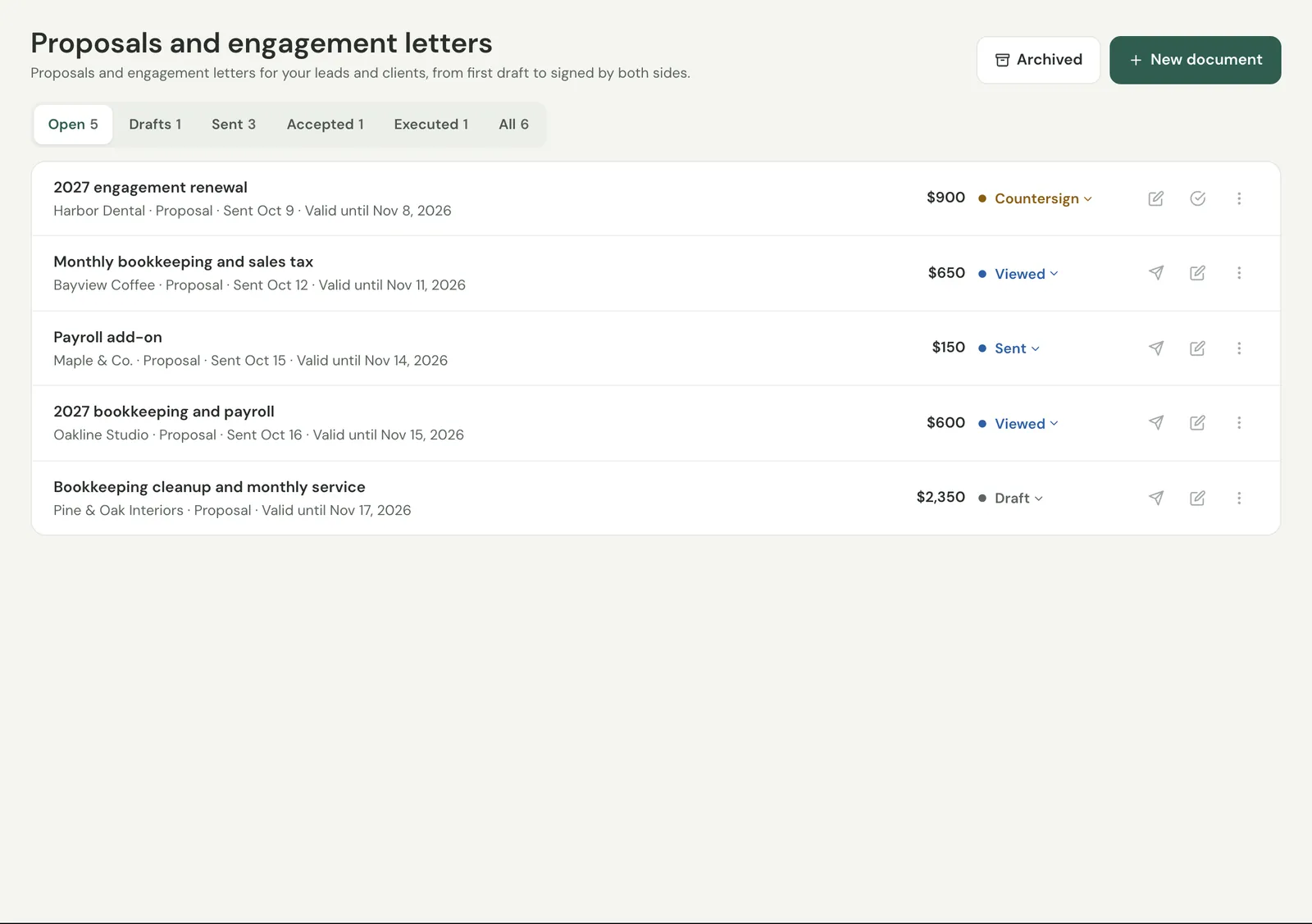
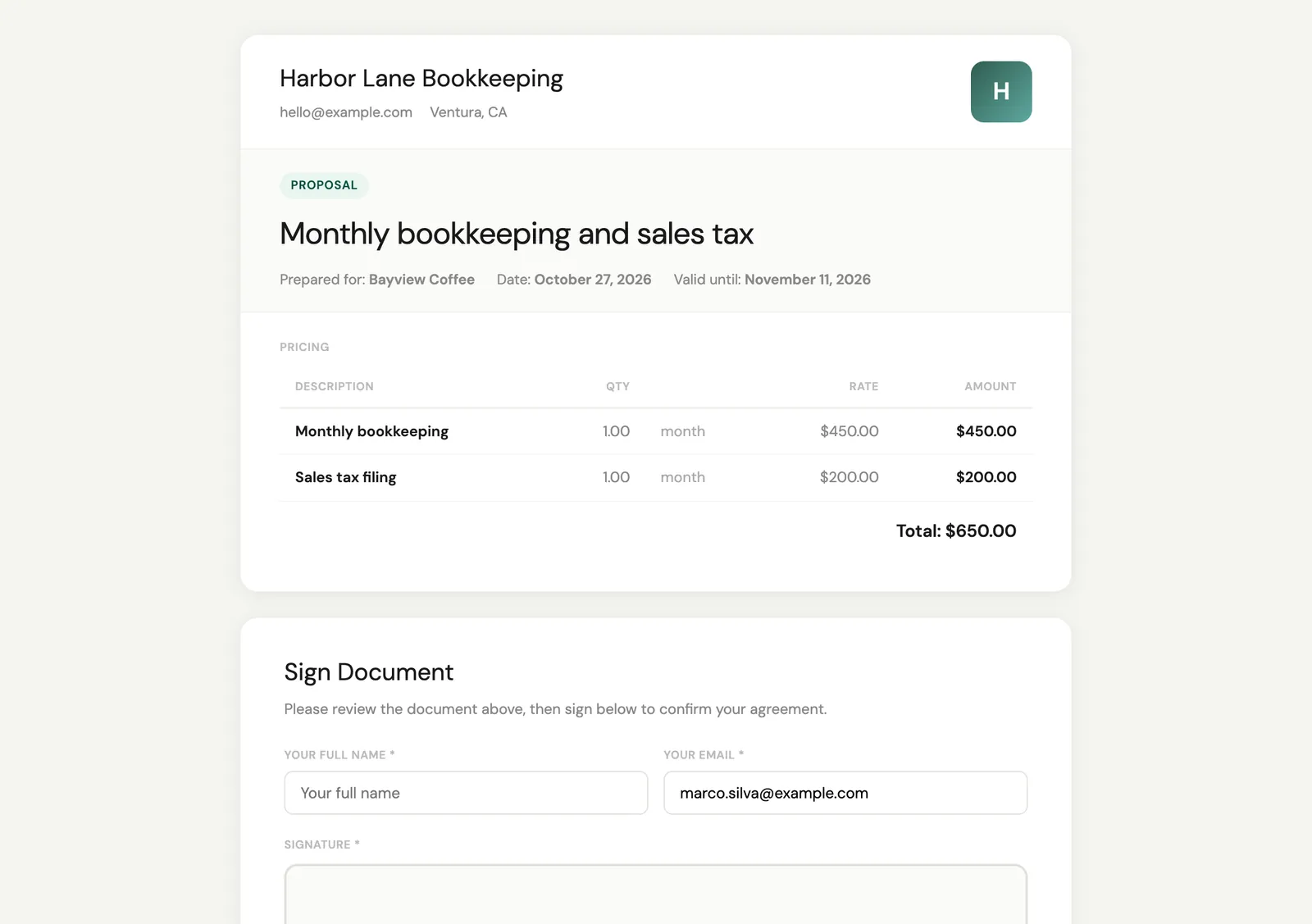
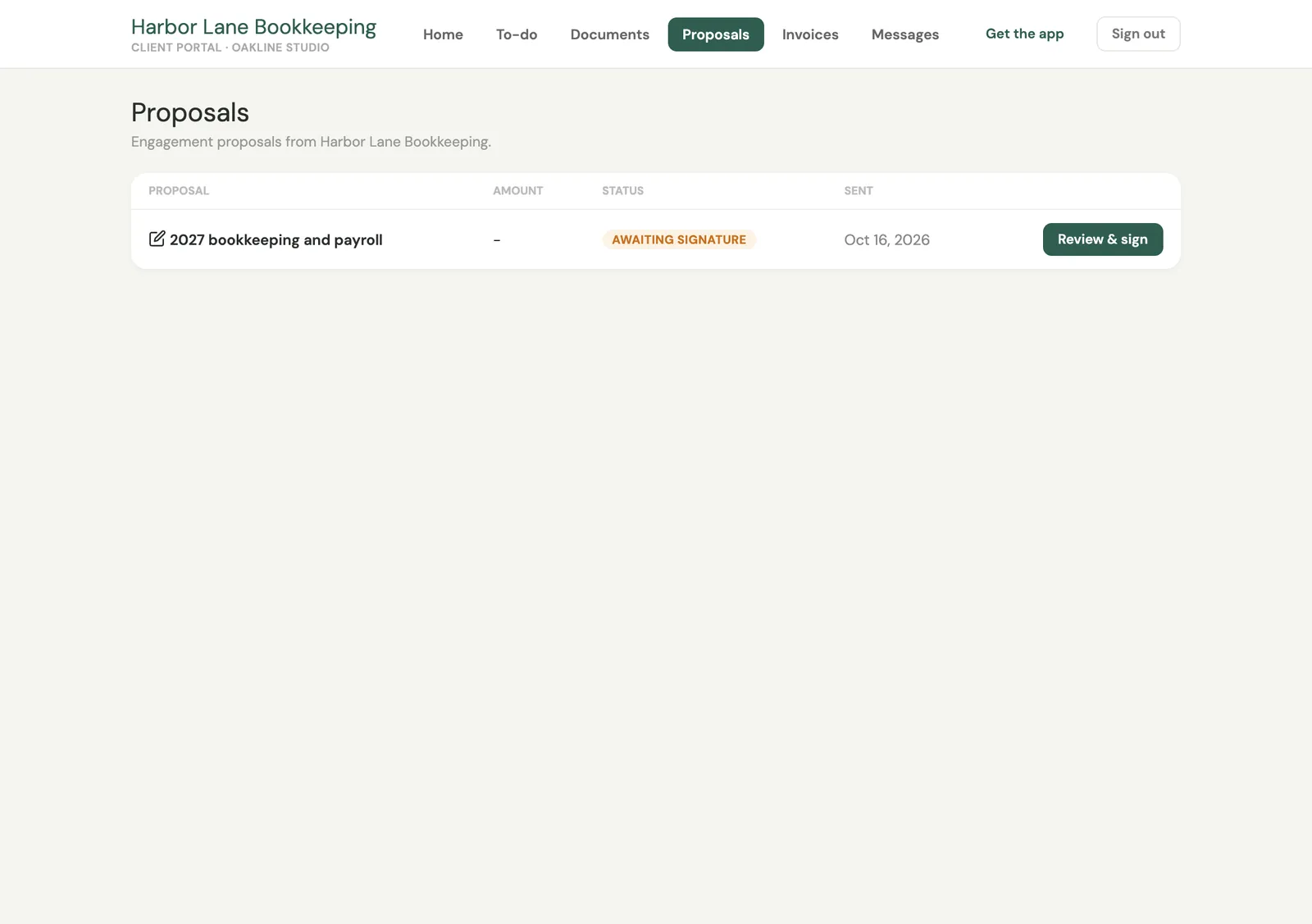
Every proposal and engagement letter, from draft to counter-signed
What you get
From price to signature to first invoice.
Fixed fees or itemized
Quote one fixed fee, itemized services from your rate list, or both.
Preview before sending
See exactly what the client sees, then send when it is ready.
Pick the right people
Choose To and CC recipients from the client's contacts.
E-signature
Clients sign online from a private link on any device, and your firm counter-signs if you want.
Billing in one click
Turn signed fees into an engagement with a budget, ready for time tracking and invoicing.
Archive old proposals
Keep the list tidy without losing history.
A signed copy for everyone
The fully signed PDF, certificate included, is emailed to the client and filed in their documents.
Templates with your terms
Proposal and engagement letter templates with your liability cap and Corporate Transparency Act wording.
Draft from discovery notes
Drop in meeting notes or a transcript and Bliss AI drafts the needs, scope and fees for you to edit.
Know when it's opened
The owner hears the moment the client opens it, and again when it is signed, in Bliss HQ and in Slack or Teams.
A closer look
How proposals works in Bliss HQ.
Build it fast
Your wording, your prices, filled in for you.
Start from a template with your intro, scope, terms, client needs and deliverables already written. Merge fields fill in the client's legal name, entity type, engagement period and assigned staff, and line items can pull from your service codes and rates.
- Price as a fixed fee, itemized lines, or both together
- Over 15 merge fields, from client name to expiry date
- Set a default validity, 30 days unless you change it
- Duplicate templates and pick a default per firm
- Turn a proposal into an engagement letter draft in one click
Draft from discovery
Turn a discovery call into a first draft.
Paste notes or drop in up to 5 files, including Word documents, PDFs and Zoom or Meet transcripts. You pick which sections Bliss AI drafts, nothing changes until you click Add to proposal, and your notes are never shown to the client.
- Drafts needs, scope, deliverables, intro, fee lines and engagement details
- Uses your service codes and only prices you set or discussed
- Anything it cannot confirm is listed for you to check
- Work notes into existing text or write a section fresh
- Nothing is sent to AI unless you tick the consent box
Send and follow up
Know the moment they open it.
Each person gets their own email and signing link. Bliss HQ tells the owner when the client opens it, and can send polite reminders on a schedule you set until it is signed.
- Owner notified on first open, with Slack alerts if you use Slack
- Optional auto reminders, every 3 days up to 3 times by default
- Reminders stop once it is signed, declined or expired
- Expired proposals cannot be signed, so old prices never come back
- Warns you if the client already has an agreement out or signed
After the signature
Signed work flows straight into the pipeline and billing.
A signed proposal or engagement letter marks the lead as won and runs your Won stage actions. One click turns the signed fees into an engagement with a budget, so time tracking and budget versus actual work from day one.
- Clients draw their signature with a mouse or finger
- Firm counter-signing is optional in Firm Settings
- Fixed fee becomes the engagement budget, or line items are summed
- Switch the engagement to a monthly retainer to bill on a schedule
- Open or download the executed PDF any time
A signature that stands up
Every signature comes with the proof.
A signature is only as good as your record of it. Bliss HQ keeps the evidence that e-signature laws such as the US ESIGN Act and UETA look for, and puts it on a certificate of completion attached to every signed agreement.
- Consent to sign electronicallyBefore signing, the client agrees to do business electronically. The exact wording they agreed to, and when, goes on the certificate.
- A fingerprint of what was signedA unique SHA-256 code is calculated from the full wording, fees and line items the client saw. Change a single word and the code no longer matches.
- Locked once signedThe proposal cannot be edited after it is signed, so the agreement you hold is exactly the one they accepted.
- Who, when and from whereThe signer's name, email, date and time, IP address and browser, plus how they reached the signing page.
- Every step on recordSent, opened, signed and counter-signed, plus reminders you send, each with a time stamp and IP address.
- Counter-signed by your firmAdd your own signature to make it fully executed, or set your firm to execute on the client's signature alone.
How it works
Three steps, then it runs.
Build
Pick services and prices, and add your terms.
Send
Preview it, choose recipients and send it from Bliss HQ.
Sign
The client signs online, the deal is won, and one click sets up the engagement to bill.
Part of one system
Connected to the rest of your firm.
Proposals start from a lead in your pipeline and, once signed, win the deal and run your Won stage actions, such as starting onboarding. One click sets up billing, all on the same client record.
Questions about proposals
What happens after a client signs?
The proposal locks, you counter-sign if your firm does, and the fully signed PDF with its certificate of completion is emailed to the client and filed in their documents. One click then turns the agreed fees into an engagement ready for invoicing.
Can I send to more than one contact?
Yes. Choose To and CC recipients from the client's contact list.
Can clients sign on their phone?
Yes. Proposals and signing work on any device.
Is the e-signature legally binding?
Bliss HQ is built around what e-signature laws such as the US ESIGN Act and UETA look for: the signer agrees to sign electronically, and you keep who signed, when, from where, a tamper-evident copy of exactly what they signed and a certificate of completion.
What is on the certificate of completion?
The document title and reference, the SHA-256 fingerprint of what was signed, the signer's name, email, time, IP address and browser, their consent to sign electronically, the firm's counter-signature, and a time-stamped history of every step.
Do I still need DocuSign or another e-signature tool?
Not for proposals and engagement letters. Signing, the certificate and the signed copy are all part of Bliss HQ, at no extra cost.
Can I see the proposal before the client does?
Yes. Preview shows exactly what the client will see. Previews never count as a view and signing is switched off.
Can a client sign an expired proposal?
No. After the valid-until date the signing page tells them to contact you for an updated copy.
Can I edit a proposal after it is signed?
No. Signed proposals are locked so your copy matches what the client agreed to. Start a new one for any changes.
What does Bliss AI need to draft a proposal?
Notes, a transcript or files from your discovery call. You choose the sections, and you review every draft before it goes into the proposal.
Does a signed proposal win the deal automatically?
Yes. The linked lead moves to Won, and any Won stage actions run, such as converting to a client or starting onboarding.
Try proposals on your own clients.
30 days free, no card. Every feature included, with unlimited staff.