 Bliss HQ
Client records
Everything about a client, on one page.
Each client's page brings together their books, what they owe you, the work in progress, every conversation and a record of who did what, so anyone on your team can pick up where someone else left off.
Each person sees only the clients they're allowed to.
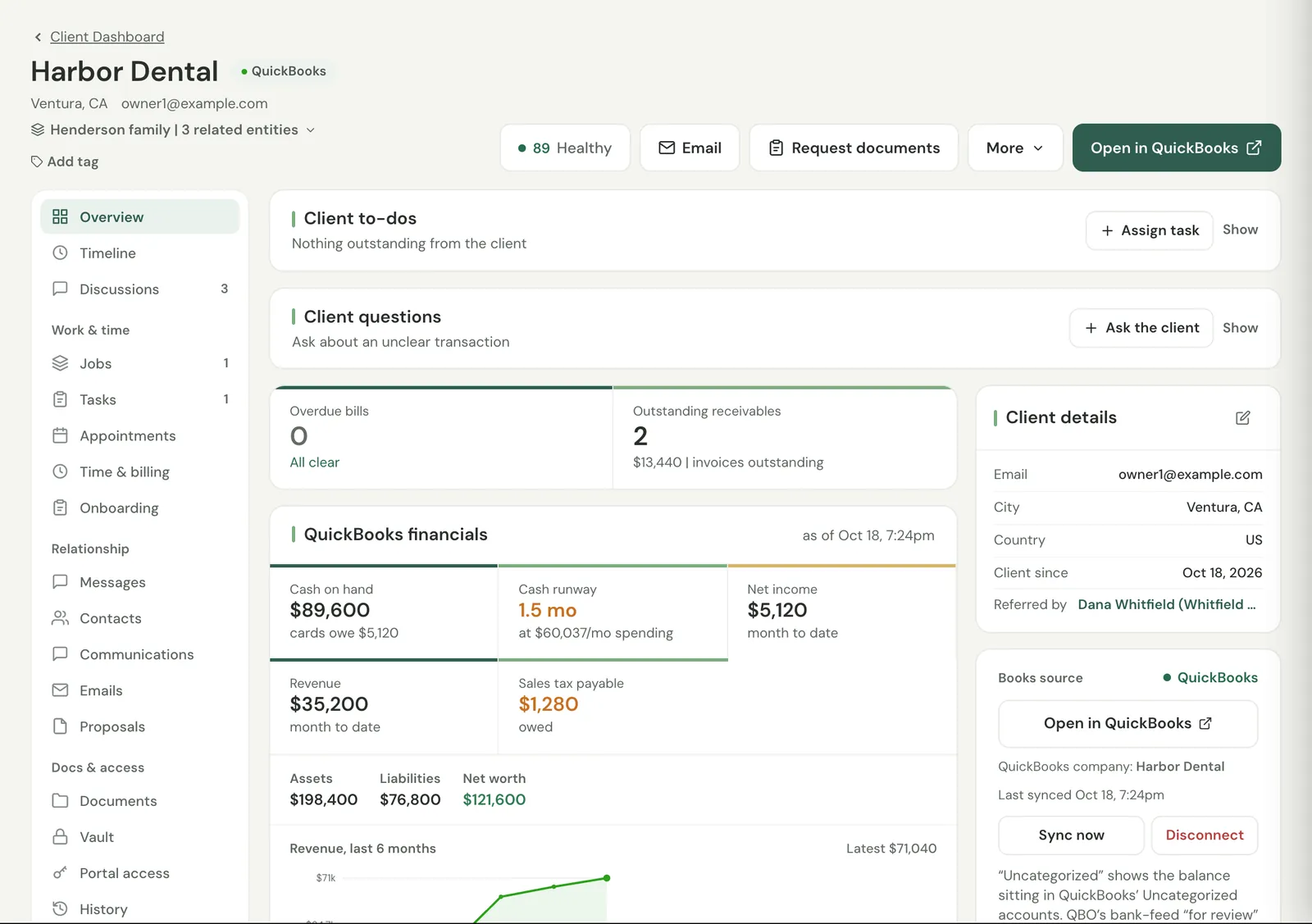
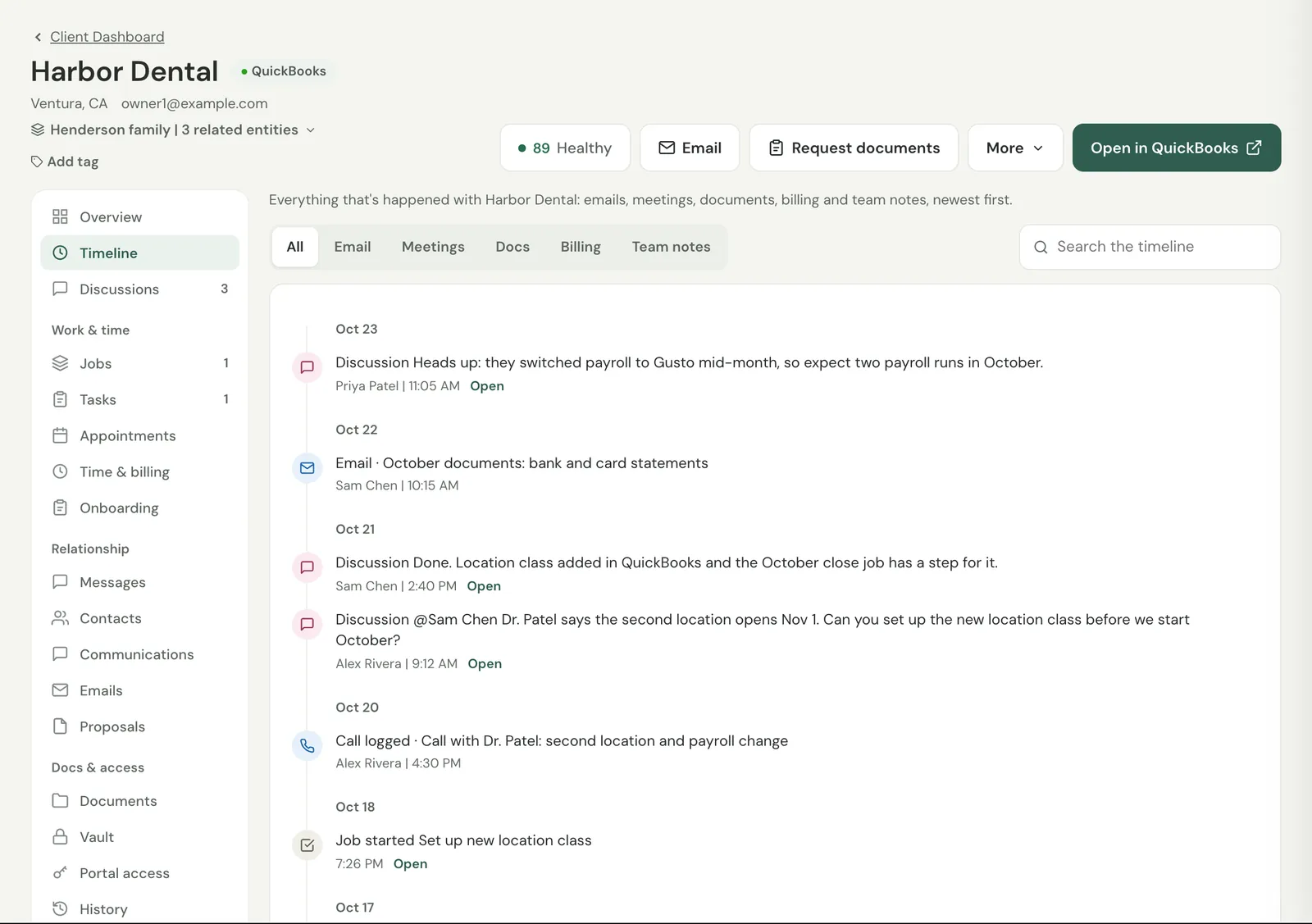
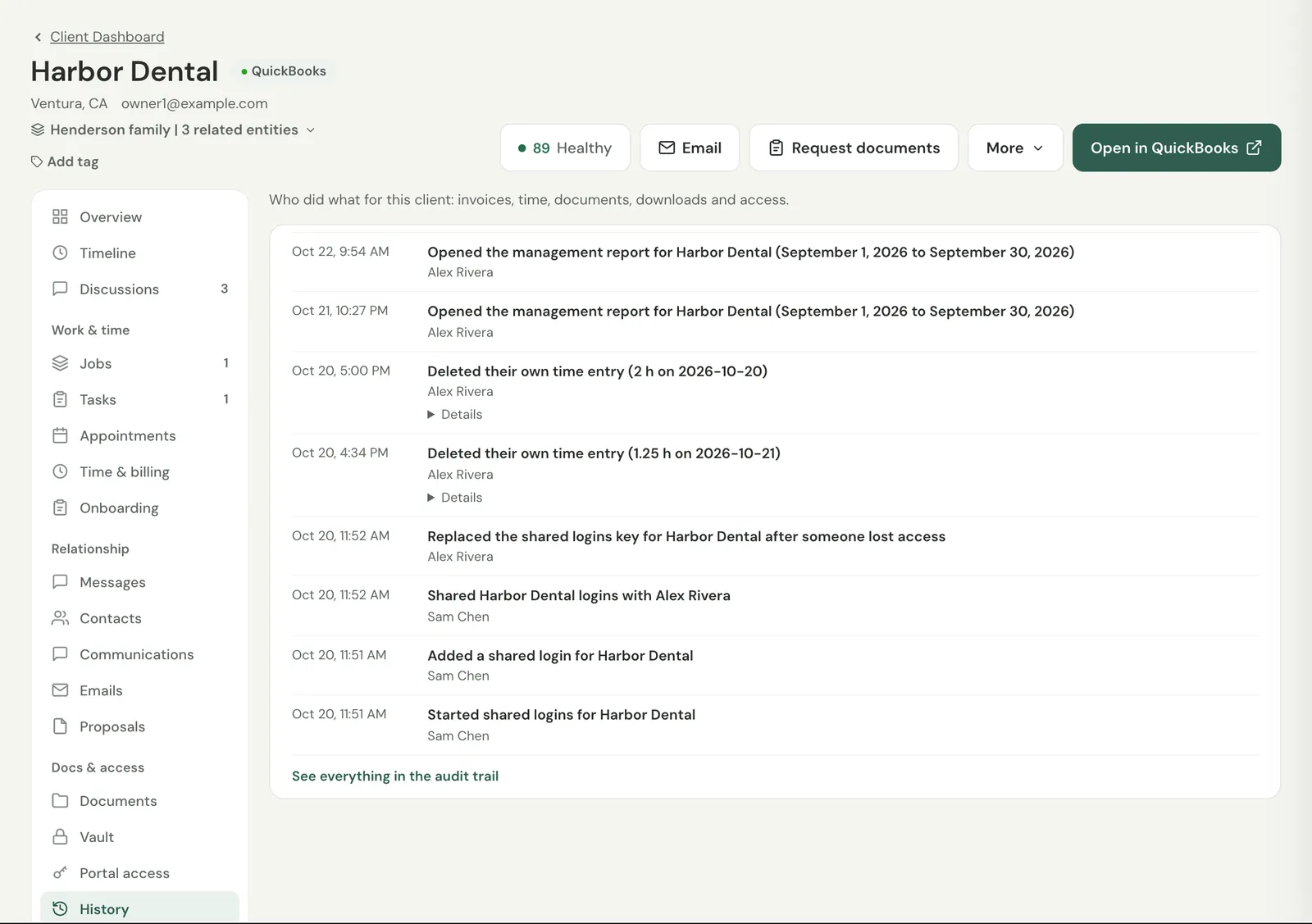
Each client's page: to-dos, questions, live books figures and details
What you get
No more digging through inboxes to find out what happened.
Overview
To-dos, open questions, bills and receivables, and live QuickBooks Online or Xero figures.
Timeline
Every email, call, meeting, document request, invoice, proposal and job, newest first.
Discussions
A private team thread on each client, with @mentions. Clients never see it.
History
Who did what for this client: invoices, time, documents, downloads and access.
Health score
A 0 to 100 score on every client, so you see who needs attention.
Your own fields and tags
Custom fields and one set of tags on clients, contacts, leads and referral partners, to filter, bulk update and use in emails.
Every tab in one place
Jobs, tasks, meetings, time, onboarding, messages, contacts, emails, proposals, documents, vault and portal access.
A closer look
How client records works in Bliss HQ.
Overview
The whole client, at a glance.
The Overview opens on what needs doing: the client's open to-dos and questions, their overdue bills and outstanding receivables, and live figures from QuickBooks Online or Xero, with a revenue chart for the last six months.
- Cash on hand, cash runway, net income, revenue and sales tax owed
- Assets, liabilities and net worth from the balance sheet
- Client details, who referred them and private firm notes
- A health score, tags and any related companies in the same group
- Email them, request documents or open their books in one click
Timeline
Everything that happened, newest first.
The Timeline gathers every interaction into one list: emails and logged calls, meetings, team notes, document requests, invoices, proposals, onboarding and jobs. Filter it to one kind, or search it.
- Filters for email, meetings, documents, billing and team notes
- Search across everything on the timeline
- Each entry says who did it and links to the item
- Invoices only show to staff with billing access
- Log calls and notes on the Communications tab so the next person knows
Discussions
A private thread for your team.
Discussions is an internal conversation about the client. Type @ to mention a teammate and they get a notification that links straight back. Clients never see it, and every note stays on the client's page.
- Only teammates who can open the client are notified
- Notes show on the Timeline under team notes
- Opening the tab clears your unread mentions for that client
- Separate from Messages, which the client does see
History
Who did what for this client.
The History tab lists the latest actions on the client: invoices, time, documents, downloads and access changes, with who did each one and when. Anything that failed or was blocked stands out in red.
- Expand any entry for the details
- Anything Bliss support did while helping is marked
- One click opens the full audit trail for this client, a year back
- Owners and admins see it, plus anyone given the View the audit trail permission
- Part of your firm's audit trail, which you can export
How it works
Three steps, then it runs.
Add the client
Add them by hand, import a list or convert a won deal.
Connect their books
Link QuickBooks Online or Xero for live figures.
Work as usual
Emails, meetings, documents and notes land on their page by themselves.
Part of one system
Connected to the rest of your firm.
The client page is where everything else shows up: Review and Monthly close link to it, emails sync onto it, the portal, proposals and invoices hang off it, and jobs and time are filed against it.
Questions about client records
Can clients see the Discussions or History tabs?
No. Both are for your firm only. Clients see their own portal.
Who can see the History tab?
Owners and admins, and anyone you give the View the audit trail permission.
Do I have to log everything by hand?
No. Synced emails, meetings, document requests, invoices, proposals, onboarding and jobs appear on the Timeline by themselves. You can also log a call or a note.
What's the difference between Timeline and History?
The Timeline is the relationship: emails, meetings, documents, invoices and notes. History is the record of actions your team took in Bliss HQ for that client, like who downloaded a report or changed access.
Does the client page work without QuickBooks or Xero?
Yes. Everything except the live figures works on its own. Connect their books any time to add them.
Can I limit which clients each person sees?
Yes. Give someone access to every client, or only to the clients in their team or the ones you pick.
Try client records on your own clients.
30 days free, no card. Every feature included, with unlimited staff.