 Bliss HQ
Integrations
Works with the tools your firm already uses.
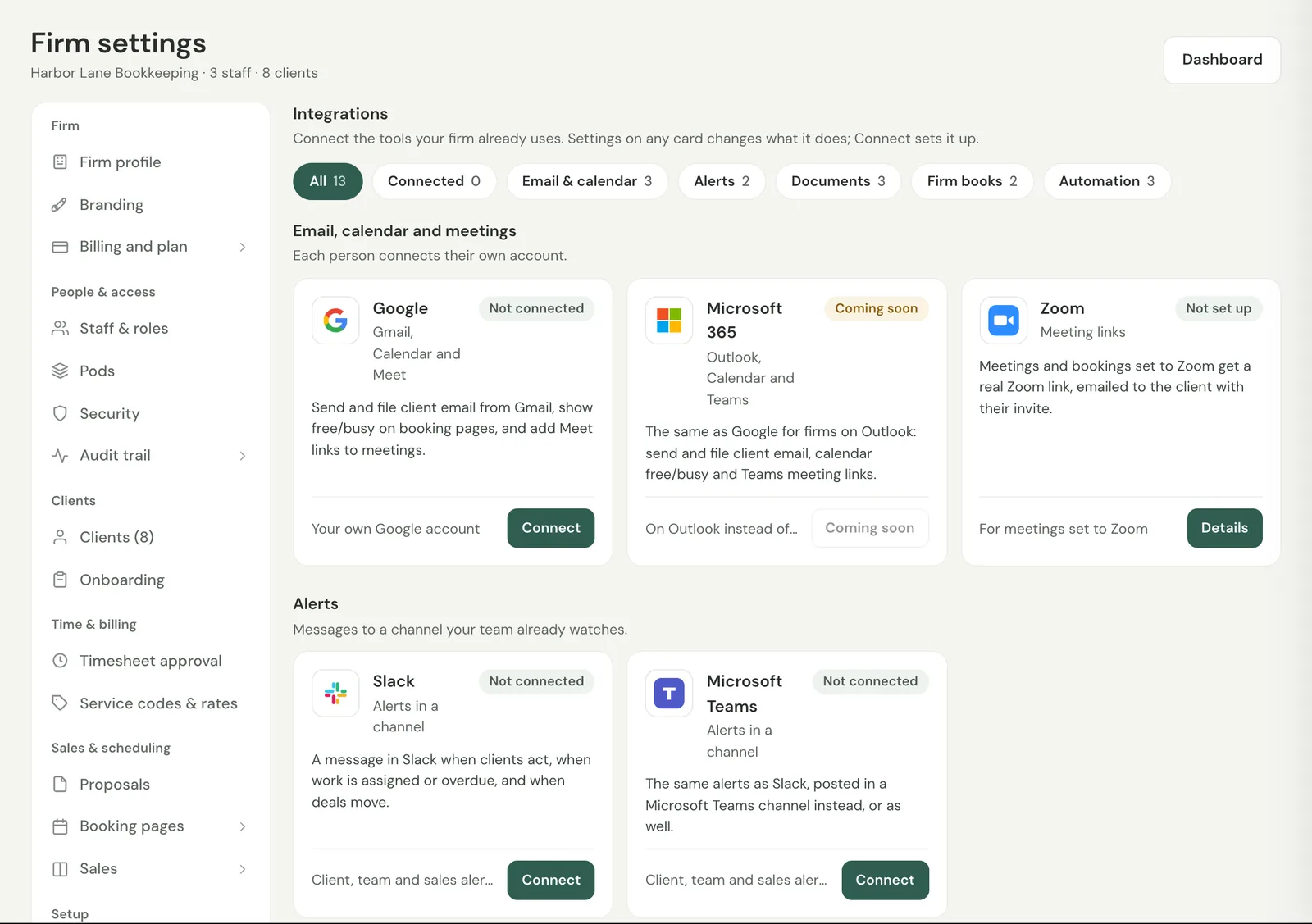
Connect your clients' books, your email and calendar, your file storage and your team chat. Everything else connects through Zapier, webhooks or the API.
Every integration is included in every plan.
Every connection your firm uses, in one place
What you get
One place to connect everything.
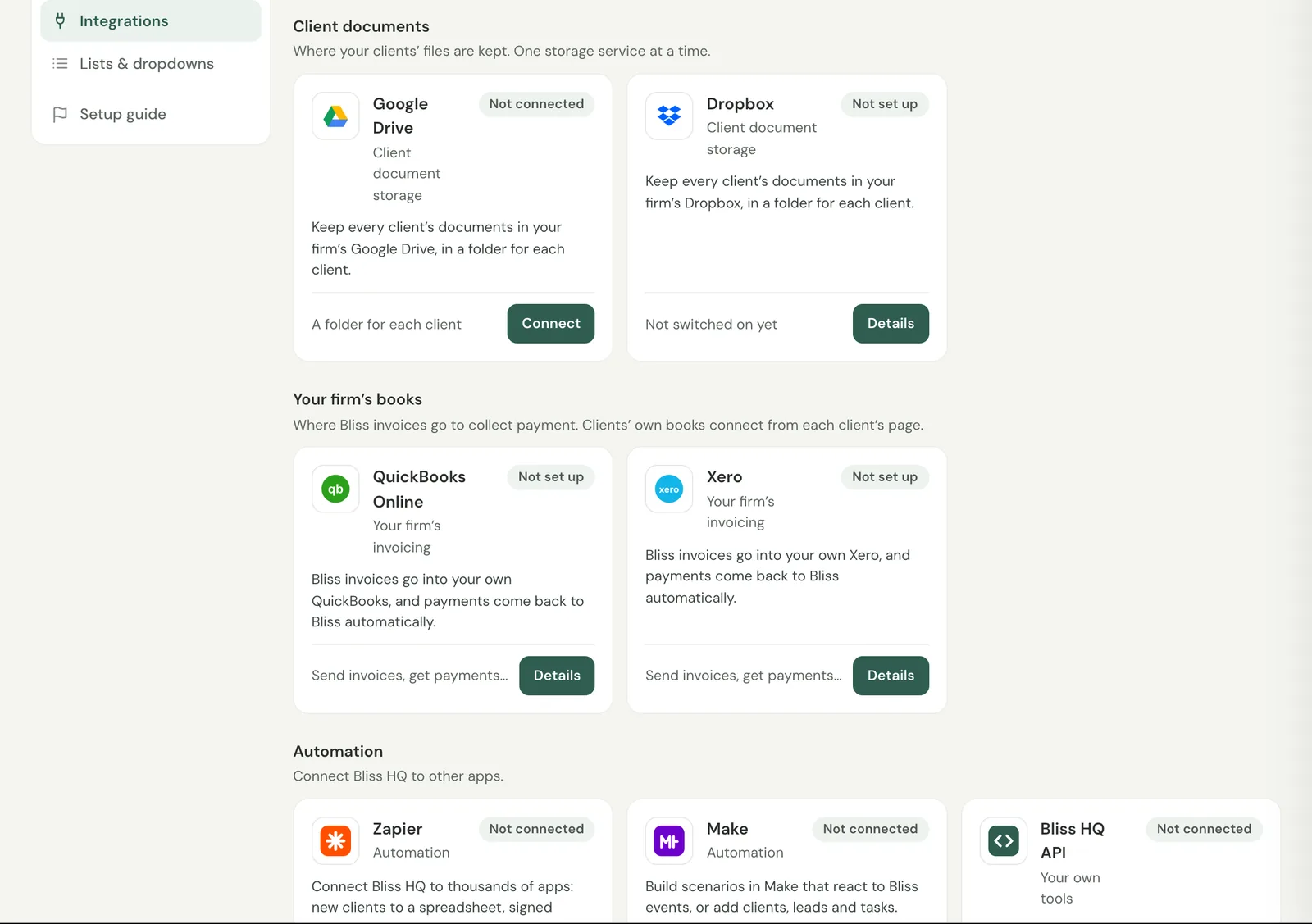
QuickBooks Online and Xero
Each client's books for review, cleanup and reports, and your firm's books for invoices.
Gmail and Google Calendar
Email matched to clients and leads, real free and busy times on booking pages.
Zoom and Google Meet
A meeting link created for every booked appointment.
Google Drive and Dropbox
Keep client documents in your own storage, a folder for each client.
Slack, Teams or Bliss Chat
Alerts about clients, your team and sales, plus a morning summary, in the chat your team already uses.
Zapier
Start a Zap when a lead comes in, a proposal is signed or a job is done. Our Zapier app is shared by invite for now, so ask us for the link.
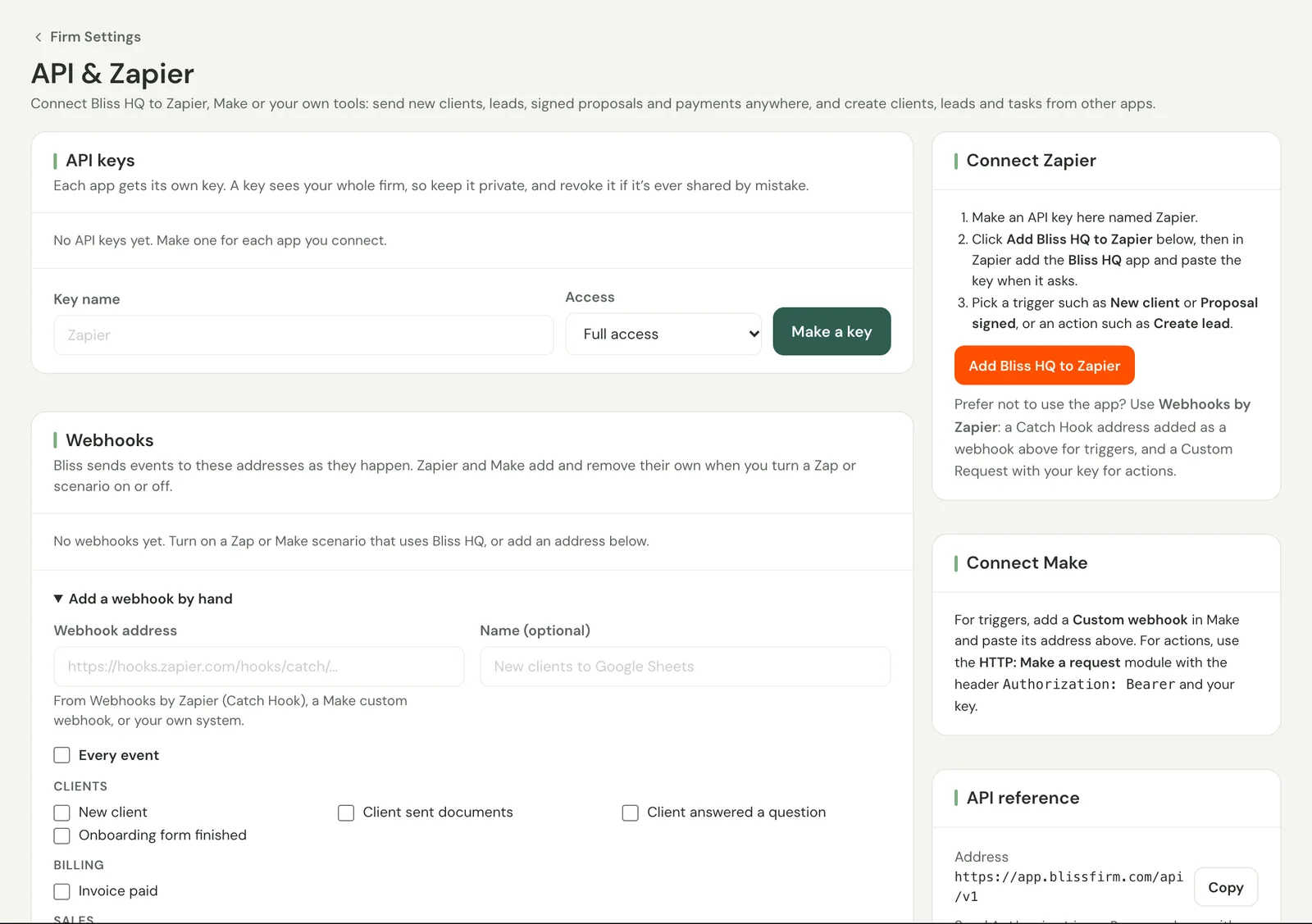
API and webhooks
An open API with keys you control, and webhooks for real-time events.
A closer look
How integrations works in Bliss HQ.
Client books
QuickBooks Online and Xero, per client and firm.
Connect each client's books once and Bliss HQ keeps a fresh summary in the background, with a Sync now button for when you need today's numbers. Connect your firm's own books too, then push Bliss HQ invoices straight into them.
- Client books power Review, Cleanup, reports, health scores and advisory pages
- In QuickBooks, match each client to a customer before pushing invoices
- Push invoices one at a time or in bulk
- Paid and part-paid status comes back automatically, or with one click
- Receipts can post to the books as an expense, image attached
Email and calendar
Email and calendar that keep themselves up to date.
Gmail sync runs on its own and files recent email against the matching client or lead by email address. Booking pages check your real Google Calendar free and busy times, and each booking lands on your calendar with a Zoom or Google Meet link.
- If an address belongs to both, the client record wins
- Optional: save client email attachments to their Documents for review
- Skips logos, files over 20 MB and anything already on file
- New emails in a thread linked to a job join that job
- Rescheduling moves the Google Calendar event and the Zoom meeting too
- Each person connects their own Gmail, Calendar and Zoom
Document storage
Client files in your own Google Drive or Dropbox.
Turn on storage and Bliss HQ creates a Bliss HQ folder with one folder per client, split into To review and filed folders by year. New files save to Bliss HQ first, then move over once the copy is checked byte for byte.
- Filing, moving or renaming in Bliss HQ updates the folders
- Renames, moves and deletes made in Drive or Dropbox are picked up
- Move everything back to Bliss HQ with one button, any time
- Copies in Drive or Dropbox stay where they are after moving back
- Reconnect the same account and Bliss HQ finds its folders again
Alerts and automation
Team alerts, Zapier, webhooks and an open API.
Send 20 kinds of alerts to a Slack, Microsoft Teams or Bliss Chat channel, grouped into client activity, team work and sales, and switch each one on or off. For everything else, 17 events can start a Zap or call a webhook in Make or your own system.
- Morning summaries of overdue work and today's sales follow-ups
- On Mondays, deals that have gone quiet and referral partners to check in with
- API keys can be read only or full access, and are shown once
- Keys stop working when the person who made them leaves the firm
- Failed deliveries retry automatically for about 20 hours
How it works
Three steps, then it runs.
Connect
Sign in to each service once: firm tools in Firm settings, client books on each client.
Choose
Pick what each connection does, like which alerts go to which channel.
Forget about it
Bliss HQ keeps everything in sync in the background.
Part of one system
Connected to the rest of your firm.
Integrations feed every part of Bliss HQ: books power review and reports, email and calendar feed My Week and the CRM, and alerts keep your team in the loop.
Questions about integrations
Do integrations cost extra?
No. Every integration is included in every plan.
Can I connect tools that are not listed?
Yes, through our Zapier app (shared by invite for now), webhooks, which also work with Make and similar tools, or the Bliss HQ API.
Who can change integrations?
Firm owners and admins, or anyone you give Manage integrations, from Firm settings. Each person connects their own Gmail, Google Calendar and Zoom.
What can the API do?
It can read clients, leads, tasks, jobs, invoices and team members, and create clients, leads, tasks and client notes. Each key allows up to 120 requests a minute.
Which events can start a Zap or a webhook?
New clients, documents sent, questions answered, onboarding finished, invoices paid, new leads and opportunities, stage changes, deals won or lost, proposals opened or signed, meetings booked, tasks created or done, jobs completed and timesheets submitted.
How do I connect Slack or Teams?
For Slack, click Add to Slack or paste a link from your own workspace. For Teams, paste a Teams Workflows link. Either way, a hello message in the channel confirms it worked.
If we stop using Google Drive, do we lose files?
No. Use Move everything back to Bliss and each document comes back, while the copies in Drive or Dropbox stay put. Bliss HQ warns you before disconnecting while it still keeps documents there.
Can some clients use QuickBooks and others Xero?
Yes. Each client connects its own file, so one firm can work with both, even side by side in one consolidated P&L.
Try integrations on your own clients.
30 days free, no card. Every feature included, with unlimited staff.