 Bliss HQ
Books Cleanup
Catch-up work, quoted, run and reported.
Turn a messy file into a guided project: rules, phases and checklists built from real cleanups, ending in a report the client can understand.
$199 flat per cleanup project, charged when you start it.
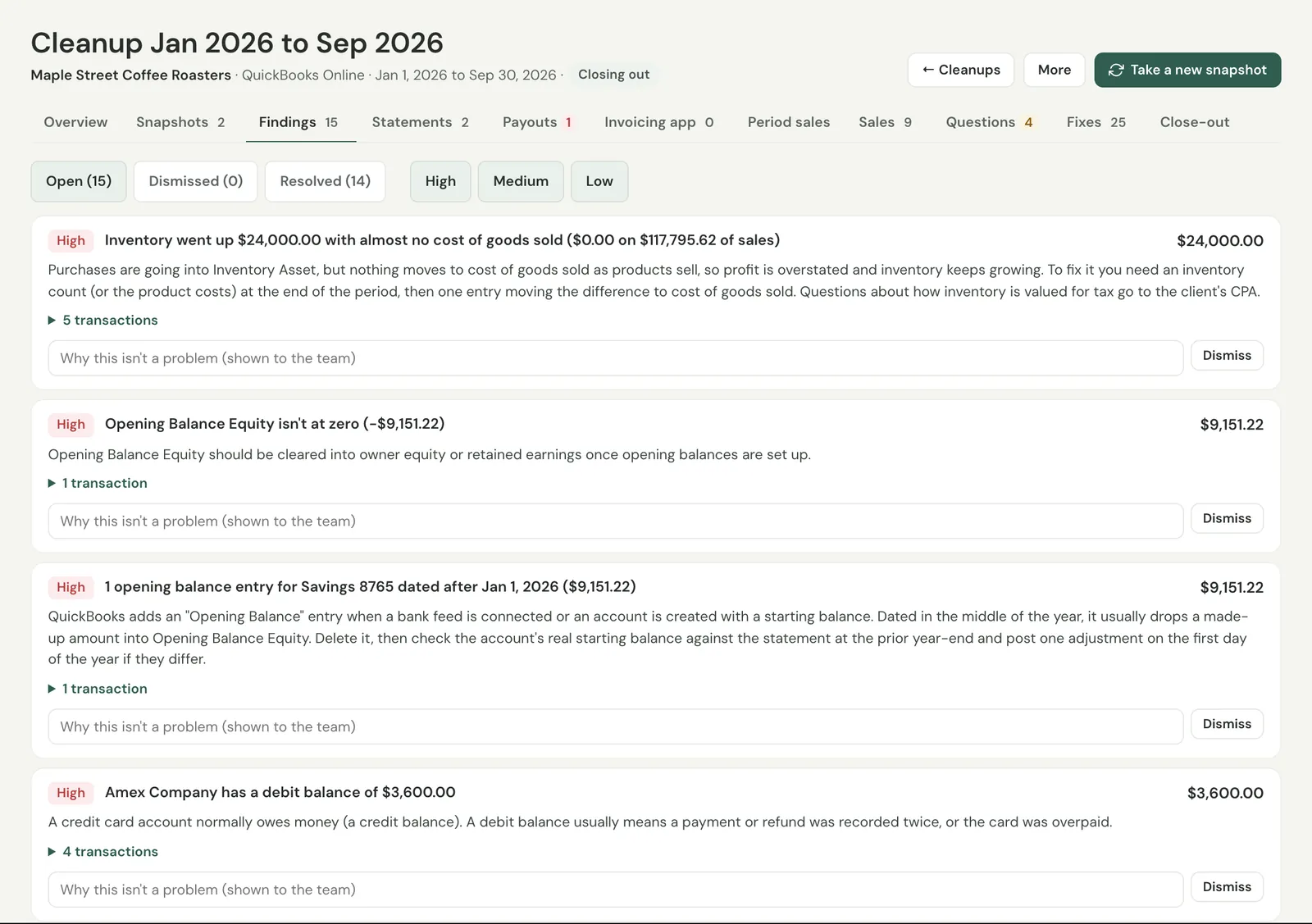
Findings: every problem in the file, ranked, with the transactions behind it
What you get
The cleanup method, built into the software.
Phased template
A step-by-step cleanup plan with phases, checklists and Mark N/A.
45+ checks
Automated checks that rank every problem in the file, with the transactions behind it.
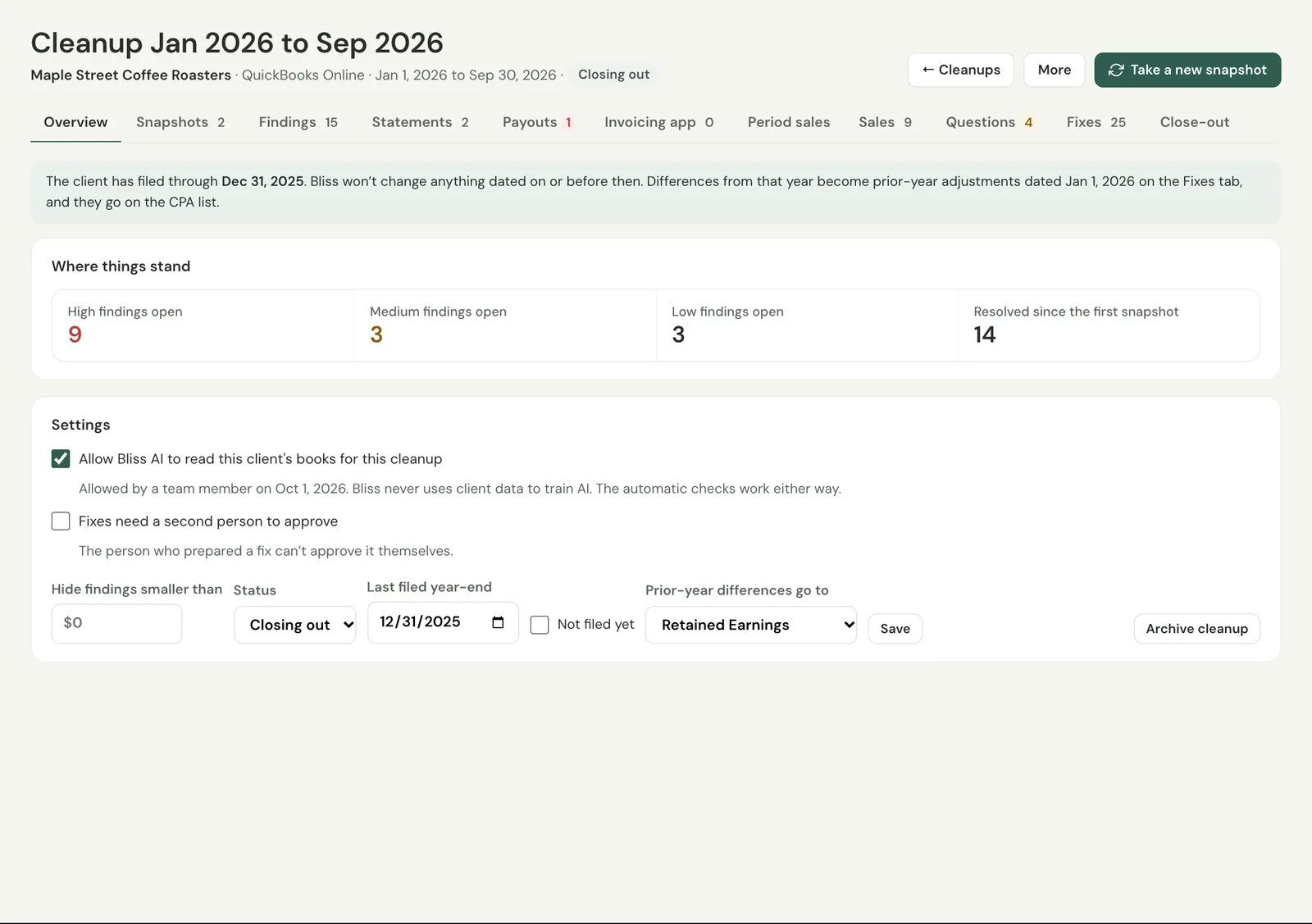
Prior-year lock
Protect filed years while you work on the rest.
Payouts and sales true-up
Tie merchant payouts and sales back to the deposits.
Close-out package
A client summary PDF and a before-and-after workbook, saved to their Documents.
Simple pricing
$199 per cleanup, refunded if you delete it before the first snapshot.
A closer look
How Books Cleanup works in Bliss HQ.
Snapshots and findings
A frozen copy of the books, then 45+ checks.
Each cleanup takes a dated, read-only snapshot of the client's QuickBooks Online file and runs more than 45 rule checks on it. Each finding is ranked high, medium or low, with its dollar impact and the transactions behind it. Take another snapshot midway or at the end: fixed findings are marked resolved, and ones you dismissed stay dismissed.
- Catches unpaired transfers, duplicate deposits and income with the wrong sign
- Spots loan advances booked as income and repayments booked as expenses
- Flags payroll provider miscoding, contractor payments, personal vendors and nonprofit coding
- Show me how gives step-by-step fix instructions for each finding
- Download the trial balance, ledger and chart of accounts as CSV
Statement workpaper
Statements read, matched and tied out.
Upload bank and card statements as PDFs or images and Bliss AI reads every line, checking that the opening balance plus the lines equals the closing balance. Lines are matched one to one against the books, and at each statement date you see the difference broken down item by item.
- Lines on the statement but not in the books, and the reverse
- Use a statement already on the client's Documents tab
- Payout files from Shopify, Stripe, Square, PayPal and Venmo Business
- Finds payouts combined, split, booked before fees or in the wrong account
- Invoicing app exports from Jobber, Housecall Pro, ServiceTitan or FreshBooks
Safe fixes
Fixes approved, checked twice, and reversible.
Fixes are proposed from the findings and the workpaper, then a person approves them. Before posting, Bliss HQ checks the closing date and re-reads each transaction to make sure it has not changed, and every posted fix saves exactly how to undo it.
- Filed years are locked: no fix can change them
- Differences become a prior-year adjustment dated the day after year-end
- Prior-year adjustments go on a list for the client's CPA
- Reconciled transactions can be recoded, never deleted or moved
- Bliss AI double-checks draft fixes, and can only keep, downgrade or drop them
Questions and close-out
Client questions, then a full close-out package.
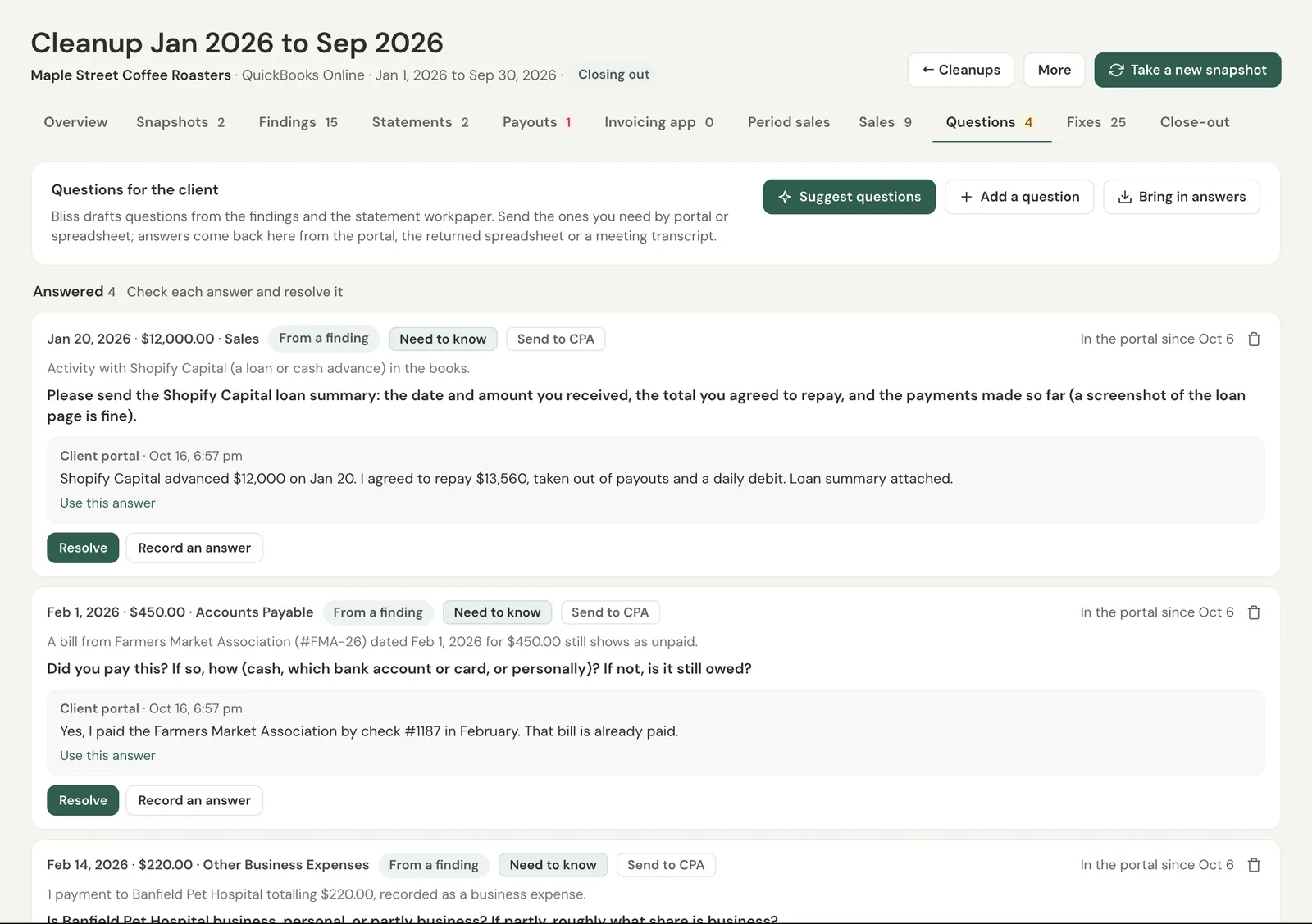
Bliss HQ drafts questions from the findings and statement lines, Bliss AI rewords them in plain language, and you send them to the portal or as a spreadsheet. Answers can come from the portal, a returned spreadsheet or a meeting transcript, and conflicting answers are flagged for you to settle.
- Close-out builds a client summary PDF and a before-and-after workbook
- Plus an adjustment log, CPA items list and chart of accounts guide
- Suggested bank rules, plus import files for missing bank lines and journal entries
- Deliverables are versioned and saved to the client's Documents
- Sales tax notice mode ties period sales across books and invoicing app
How it works
Three steps, then it runs.
Start a cleanup
Pick the client and the date range.
Work the phases
Move through findings, statements, client questions and fixes, tab by tab.
Hand it over
Send the report and move the client onto monthly work.
Part of one system
Connected to the rest of your firm.
A cleanup can create its own Books Cleanup job, saves its deliverables to the client's Documents, and ends with a drafted wrap-up email for the client.
Questions about Books Cleanup
How is Books Cleanup priced?
$199 flat per cleanup project, charged when you start it. If you delete it before the first snapshot, it is refunded.
Which platforms does it support?
Books Cleanup projects work with QuickBooks Online. For Xero clients, use the Full cleanup tab on the Review page to scan the whole ledger.
Can I bill the client for it?
Yes. Track time against a fixed-fee or hourly engagement and invoice from Bliss HQ.
How much history can one cleanup cover?
Up to 24 months. For a longer backlog, start a second cleanup for the earlier or later months.
Can I see one before I pay?
Yes. A sample cleanup on made-up books for a coffee roaster opens in the same page and tabs, read-only.
Does Bliss AI read the client's books without asking?
No. Someone at your firm turns on Bliss AI for each cleanup, and the report records who did it and when. Reading statements and the AI review both need it switched on.
Can I fix sales the books are missing?
Yes. Upload a sales report, such as Shopify's Sales over time, and Bliss HQ drafts one journal entry per month for the difference, never into a filed year.
Can it set up a job for the work?
Yes. Tick the option when you start and Bliss HQ creates a Books Cleanup job from your template, covering the cleanup's period.
Try Books Cleanup on your own clients.
30 days free, no card. Every feature included, with unlimited staff.