 Bliss HQ
Workflow & jobs
Recurring work that never slips.
Turn every monthly, quarterly and annual task into a job with steps and checklists. Bliss HQ creates the next one on schedule and gives everyone their own week.
Includes My Week, Tasks and a team calendar.
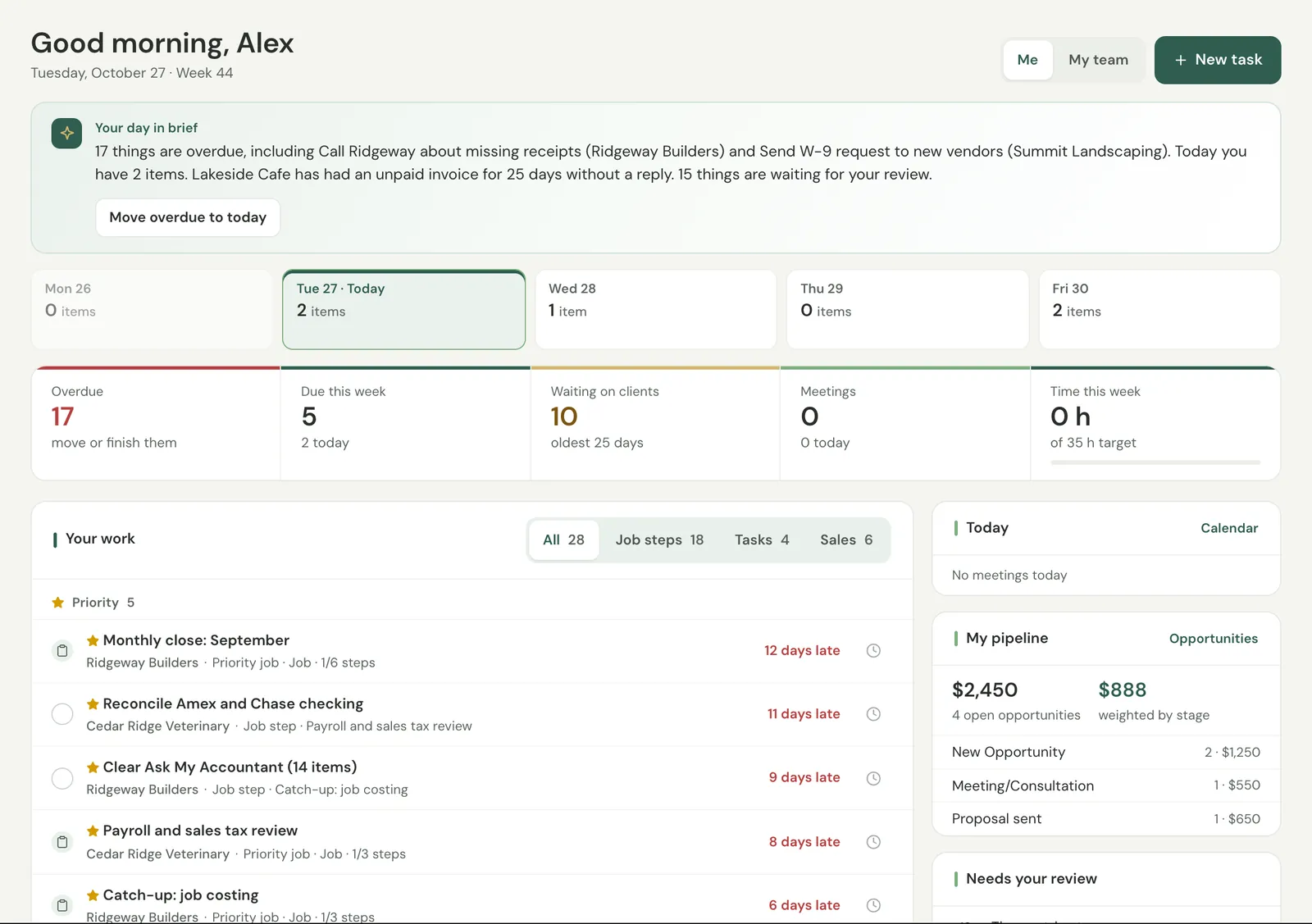
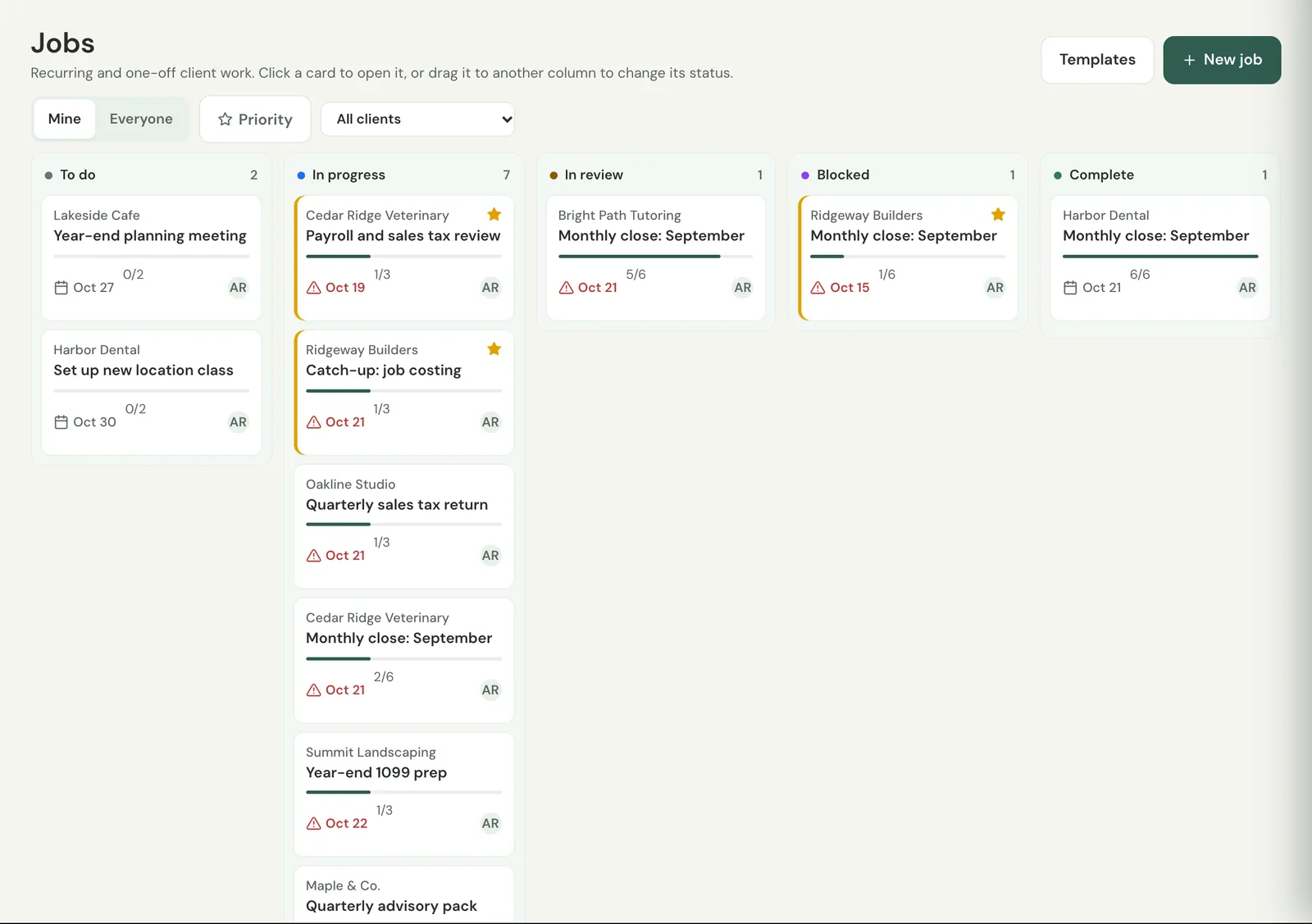
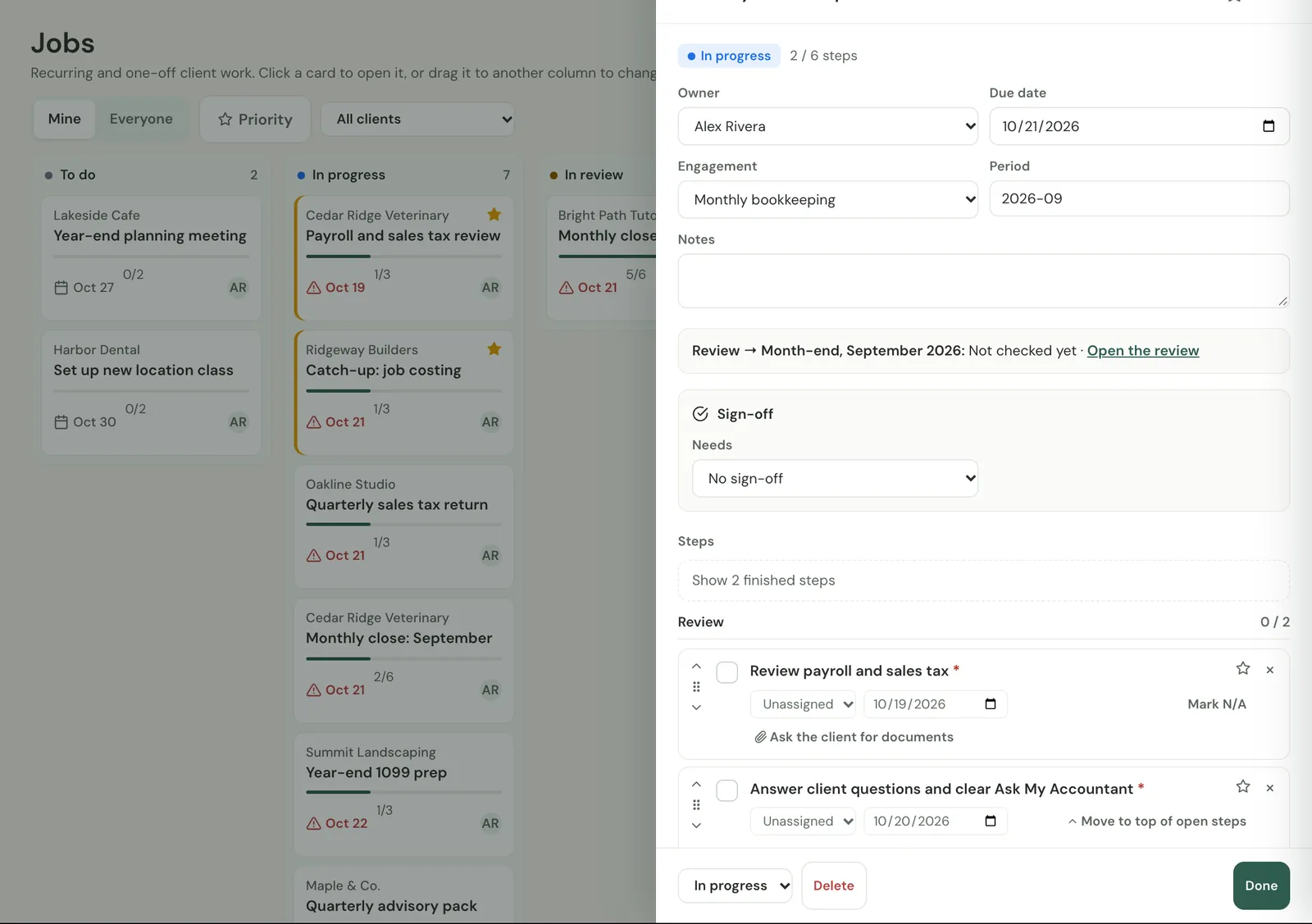
My Week: a daily brief, the week ahead and everything due
What you get
Know who is doing what, for every client.
Job templates
Define the steps, phases and checklists once.
Created on schedule
Weekly, monthly, quarterly and annual jobs appear automatically.
My Week
Your tasks, job steps, meetings and sign-offs, by due date, with a daily brief.
Board and sign-off
Drag jobs across the board, then send them for review and approval.
Comments and @mentions
Discuss a job in place and notify the right person.
Client discussions
A private team thread on every client, with full history.
Bliss Chat
Team chat built in: channels, direct messages, threads and alerts, in Bliss HQ or its own window with desktop notifications.
A closer look
How workflow works in Bliss HQ.
Starter templates
Ten starter templates, built from real firm work.
Load ten ready-made templates, from Monthly Bookkeeping Close to 1099 Filing and New Client Setup, then change them to fit how your firm works. Load the starters again later and copies you never touched update to the latest version, while templates you edited stay exactly as they are.
- Monthly close starter: 16 steps across 5 phases, Gather to Deliver and lock
- Also Weekly Bookkeeping, Quarterly Sales Tax Filing, Payroll Run and Year-End Close
- Bill Pay Run, Quarterly Payroll Filings and a Books Cleanup template included
- Duplicate any template to make a version for one type of client
- Set a default hours budget per template, copied onto every job
Smart steps
Steps that know their order and their owner.
Each step can have its own due date, owner, checklist and phase, all set once in the template. Steps can wait on each other, so nobody sends the reports before the manager review is done.
- Step due dates count back from the job due date, like 7 days before
- A step that depends on another can't be ticked until that one is done
- Only a manager can mark a required step not applicable
- Give steps to the job owner or the person doing the work
- A client documents step sends a tracked request and ticks itself when approved
Scheduling at scale
Schedule one template across many clients at once.
Pick a template, tick the clients, then choose weekly, monthly, quarterly or annually, the due day and how early the job should appear. Bliss HQ creates each period's job once, names it for the period, and tells the owner and assignees it is ready.
- Jobs appear up to 90 days before they are due, 10 by default
- Never a duplicate: one job per client, per template, per period
- Create this period's job now instead of waiting for the schedule
- Owner and doer are only set on clients they can open
- Runs on your firm's own time zone
Review and sign-off
Review, then approval, before any job closes.
Turn on one or two review levels for a template. When every step is done, the preparer sends the job for review, the reviewer signs off or sends it back with a note, and an optional approver gives the final yes.
- Nobody reviews their own work, and the approver can't be the reviewer
- Sending a job back needs a note, saved to its comment thread
- Reviewers are notified in Bliss HQ, and in Slack if connected
- Jobs waiting for you show in the review list on My Week
- Firm owners can sign off anything, so a one-person firm never gets stuck
How it works
Three steps, then it runs.
Build a template
Steps, checklists and who does what.
Assign clients
Pick the frequency and the team for each client.
Work your week
Everyone opens My Week and gets going.
Part of one system
Connected to the rest of your firm.
Jobs feed the Monthly close board, link to the client's engagement and hours budget, and show where month-end Review stands, with each bank account's reconciled-through date. A finished job can also start a Zapier step.
Questions about workflow
Can each person see only their own work?
Yes. My Week shows your own queue, and managers can switch to a team view.
Can templates include checklists?
Yes. Steps can have phases and checklists, and a step that doesn't apply can be marked not applicable.
Can I move a job to another day?
Yes. Change the due date in the job, or on any single step. Drag a card on the board to change its status.
What happens when I @mention someone on a job?
They get a notification in Bliss HQ and an email with your comment, plus a Slack message if your firm uses Slack alerts. Only teammates who can open that client are notified.
Can I attach a client's emails to a job?
Yes. With Gmail connected, pick from that client's recent synced emails and they show on the job, readable in full.
Can I star the important work?
Yes. Star a whole job or a single step and it moves to a Priority group at the top of My Week.
What if someone falls behind?
My Week has a one-click option to move your overdue tasks and job steps to today.
Can I see whether jobs finish on time?
Yes. The Job performance report shows, per template, how many jobs finished on time, how late the rest were and how long jobs take. It covers the last 90 days by default.
Try workflow on your own clients.
30 days free, no card. Every feature included, with unlimited staff.