 Bliss HQ
Time & billing
Track it, bill it, push it to your books.
Timers, timesheets, WIP, fixed fees and retainers in one place. Invoices push to your firm's QuickBooks Online or Xero, and payments come back automatically.
Pushes to your own QuickBooks Online or Xero.
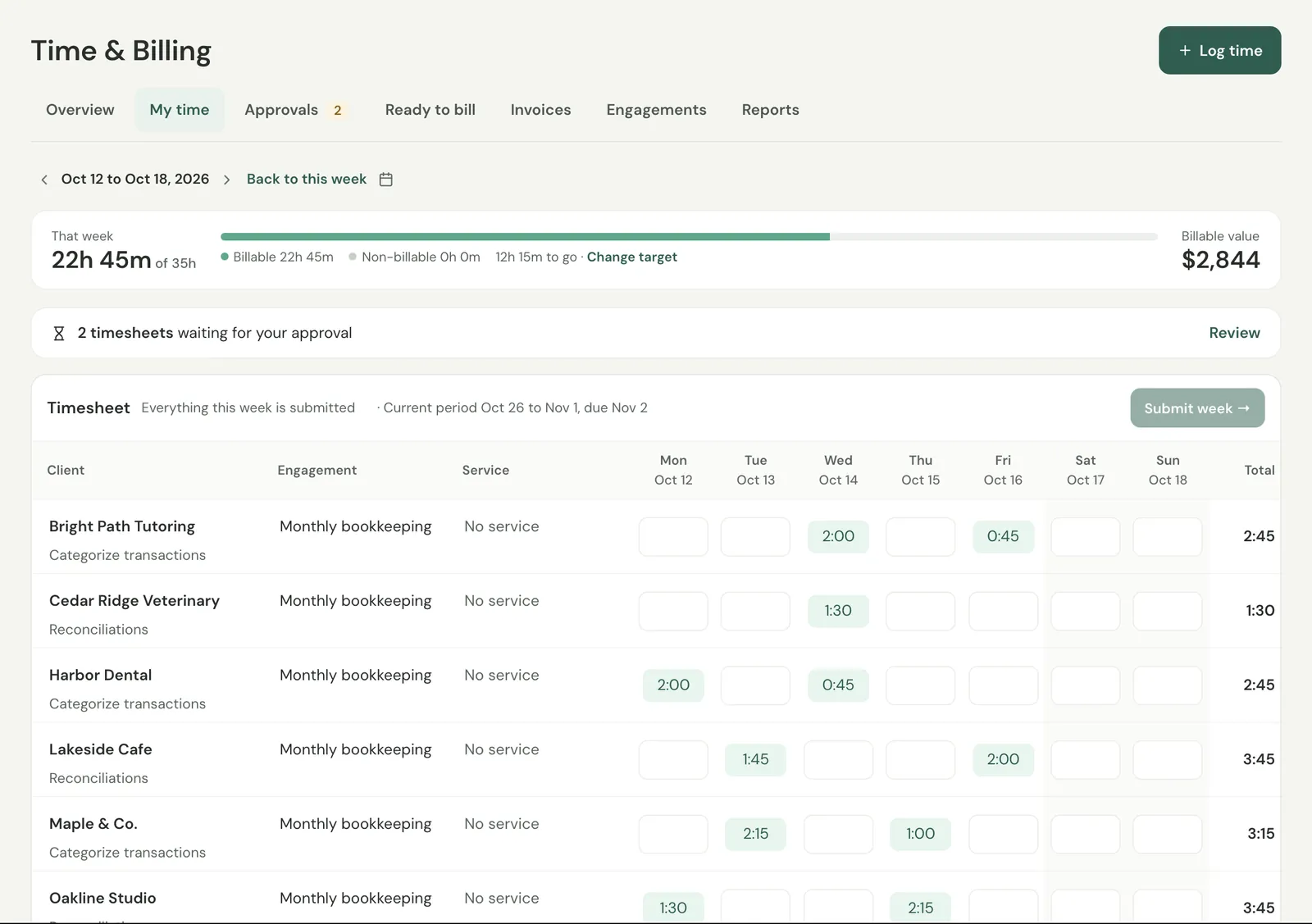
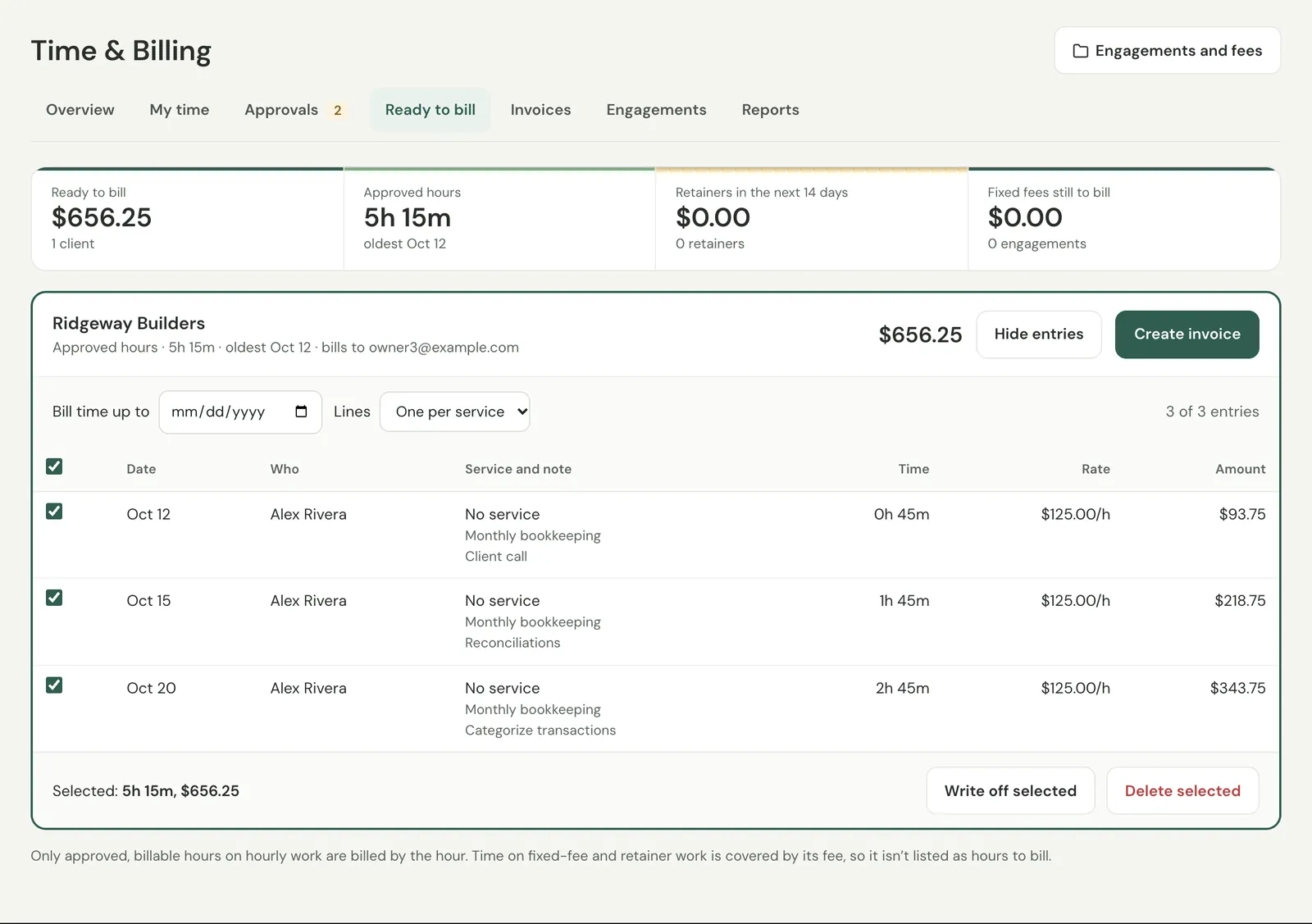
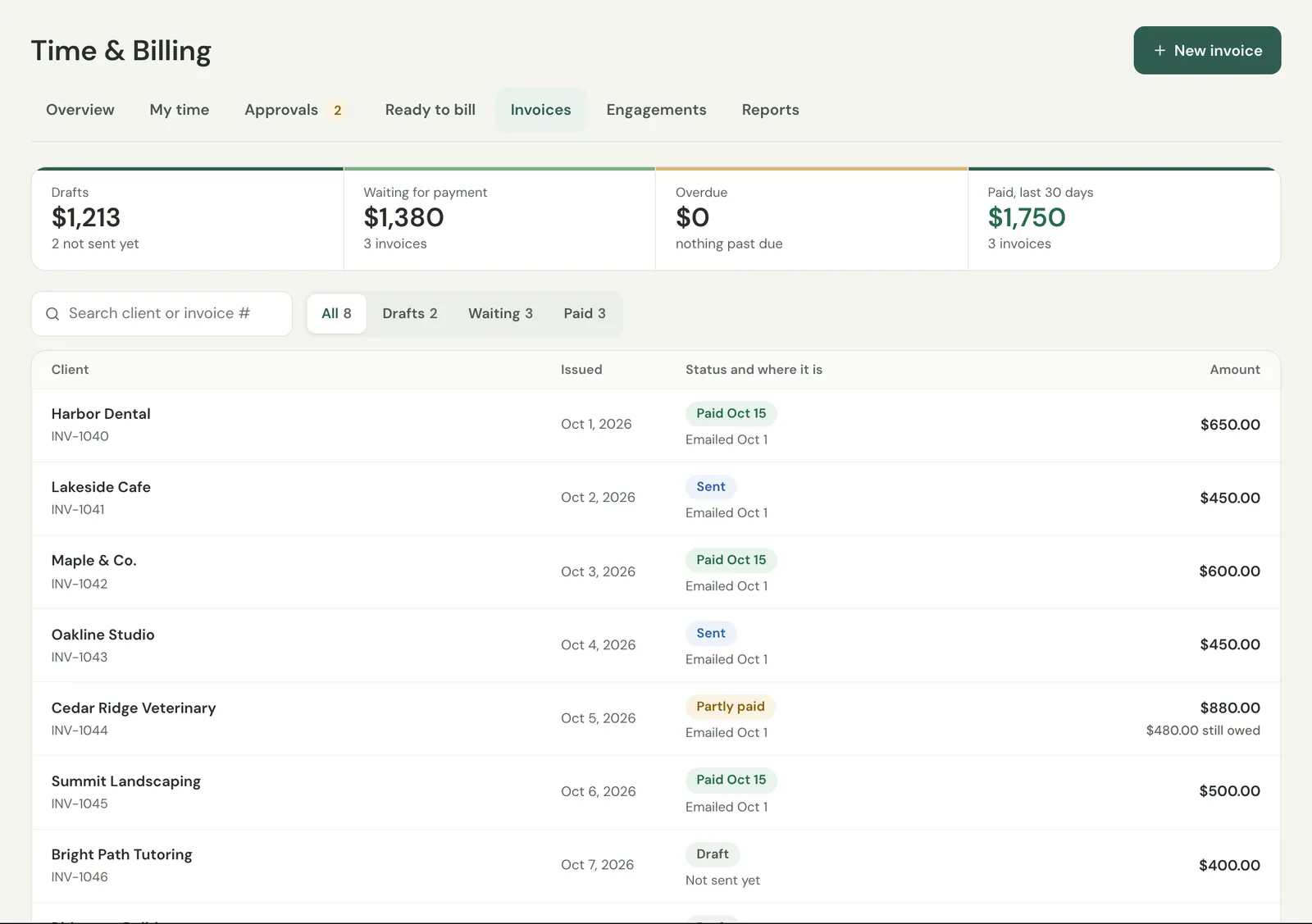
The weekly timesheet, with every client and day at a glance
What you get
Get paid for all of it.
Timer everywhere
Start, switch and stop from the top bar. Switching saves the last entry.
Week view
A weekly grid with Copy last week and quick duration shorthand.
Engagements
Fixed fees, hourly work and retainers with budget vs actual.
Retainer schedules
Recurring invoices created on schedule, ready to review.
Push to your books
Send invoices to your QuickBooks Online or Xero, matched to the right customer.
Payments come back
Paid and part-paid status pulled back automatically.
Timesheet approval
People submit their timesheet and a manager approves it before it is billed.
Credit notes
Credit all or part of an invoice sent from Bliss HQ, with the reason on record.
Timer on your phone
The same timer in the Bliss Snap app, on the Lock Screen and with Siri.
Approval rules
Send specific work to specific approvers. The first rule that matches wins.
A closer look
How time & billing works in Bliss HQ.
Time that is easy to log
Type 1:30, 90m or 1h30. It just works.
Every time field understands shorthand: 1.5, 1:30, 90m and 1h30 all mean an hour and a half. Starting a new timer saves the one already running, and stopping a timer opens a quick check of the time, description and billable setting.
- Pause and resume the timer from the top bar
- Your recent client and service pairs are one click away
- Copy last week skips days that already have that work
- Set your own weekly hours target and track against it
- Billable is set from the service, not a blanket yes
Timer on your phone
Start at your desk, stop from your Lock Screen.
Bliss Snap shows the running timer on the iPhone Lock Screen and in the Dynamic Island, in your firm's color. It stays in step when you start, pause or stop the timer anywhere, including Bliss HQ on a computer.
- Pause, Resume, and Stop and save, right from the Lock Screen
- Say "Track time for Oakline Studio in Bliss Snap" to Siri
- The app also gives staff My Week, Clients, Messages and Snap
- Discard a timer you started by mistake
Rates, approval and WIP
The right rate, approved, then ready to bill.
Each entry gets the most specific rate: engagement, then client, then person, then service, then role, then your firm default, as of the day the work was done. Only approved, billable hourly time reaches Ready to bill.
- Managers must add a note when they reject a week
- Owners, admins and managers can submit time for their team
- Lock an approved period so it cannot change
- WIP aging in buckets: 0 to 30, 31 to 60, 61 to 90, 90+ days
- Write-offs need a reason and can be undone
- Weekly, every 2 weeks, twice a month or monthly periods, with reminders to submit
Invoices, credits and books
Review once, then email it, push it, or both.
Bill the entries you pick, or all time up to a date, as one line per entry, one line per service, or a single line. On the review screen you can edit lines, dates and notes, then email the invoice from Bliss HQ, push it to your QuickBooks Online or Xero, or both.
- Fixed fees: bill a 50% deposit, 25%, or whatever is left
- Retainers bill weekly, every 2 weeks, monthly, quarterly or yearly
- Each retainer can make a draft for review or send itself
- Remove a time line from a draft and the time returns to Ready to bill
- The first QuickBooks push asks you to match or create the customer
- Firm owners hear when an engagement goes over budget
How it works
Three steps, then it runs.
Set up engagements
Usually created for you when a proposal is signed.
Track time
Timers and timesheets, linked to clients and jobs.
Invoice
Review drafts, push them to your books, and watch payments arrive.
Part of one system
Connected to the rest of your firm.
Signed proposals create engagements, jobs link to time, and realization reports show which clients are worth what you charge.
Questions about time & billing
Do invoices go into my own QuickBooks or Xero?
Yes. Each invoice is pushed to your firm's books and matched to the right customer.
Can I edit an invoice before sending?
Yes. Draft invoices can be edited, line by line.
Can staff see each other's time?
Only if you allow it. By default people see their own time and their direct reports.
What does a credit note do?
It credits part or all of an invoice, up to the invoice total, with a reason the client sees. Crediting a whole unpaid invoice can send its time back to Ready to bill, and you can email the credit note to the client. For an invoice already in QuickBooks or Xero, issue the credit there and Bliss HQ picks up the new balance.
What if a fixed fee is billed in pieces?
The engagement shows the agreed fee, how much is billed and how much is left. The Bill rest button opens the final invoice with the remaining amount filled in.
What if my QuickBooks invoice number is already taken?
Bliss HQ finds the next number that is free in both Bliss HQ and QuickBooks and pushes again. If the invoice was already sent, it asks you first.
Can a retainer stop on its own?
Yes. Give it an end date or a set number of invoices. Completing the engagement pauses its retainer too.
Can I check for payments right now?
Yes. Paid and part-paid status comes back on its own, and the Check for payments button on Invoices fetches it on demand.
Try time & billing on your own clients.
30 days free, no card. Every feature included, with unlimited staff.