 Bliss HQ
Client onboarding
Onboarding that runs itself.
Send a branded questionnaire, request the documents you need and let Bliss HQ send the reminders. They stop the moment the client finishes.
Starts with a ready-made New Client Onboarding template.
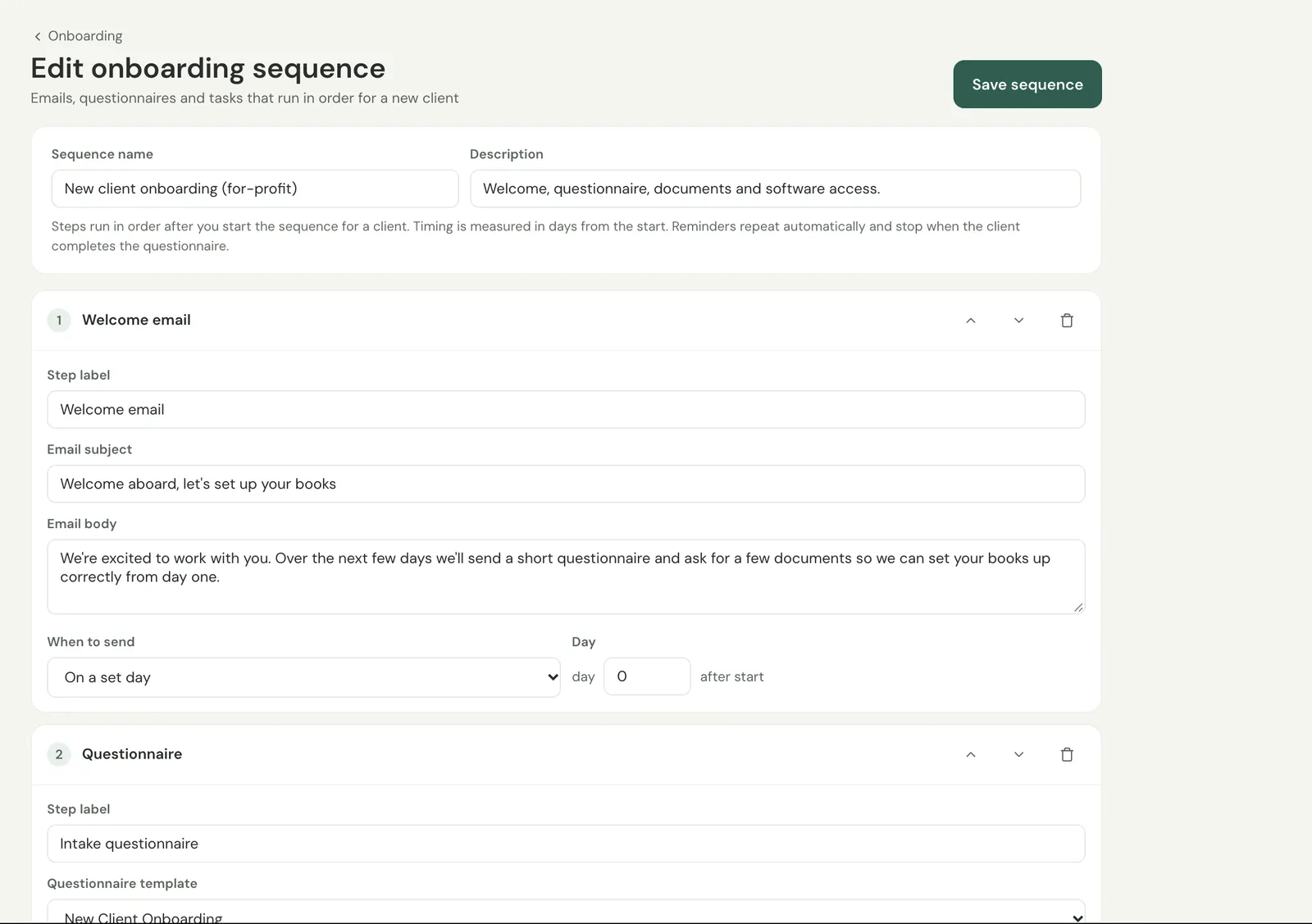
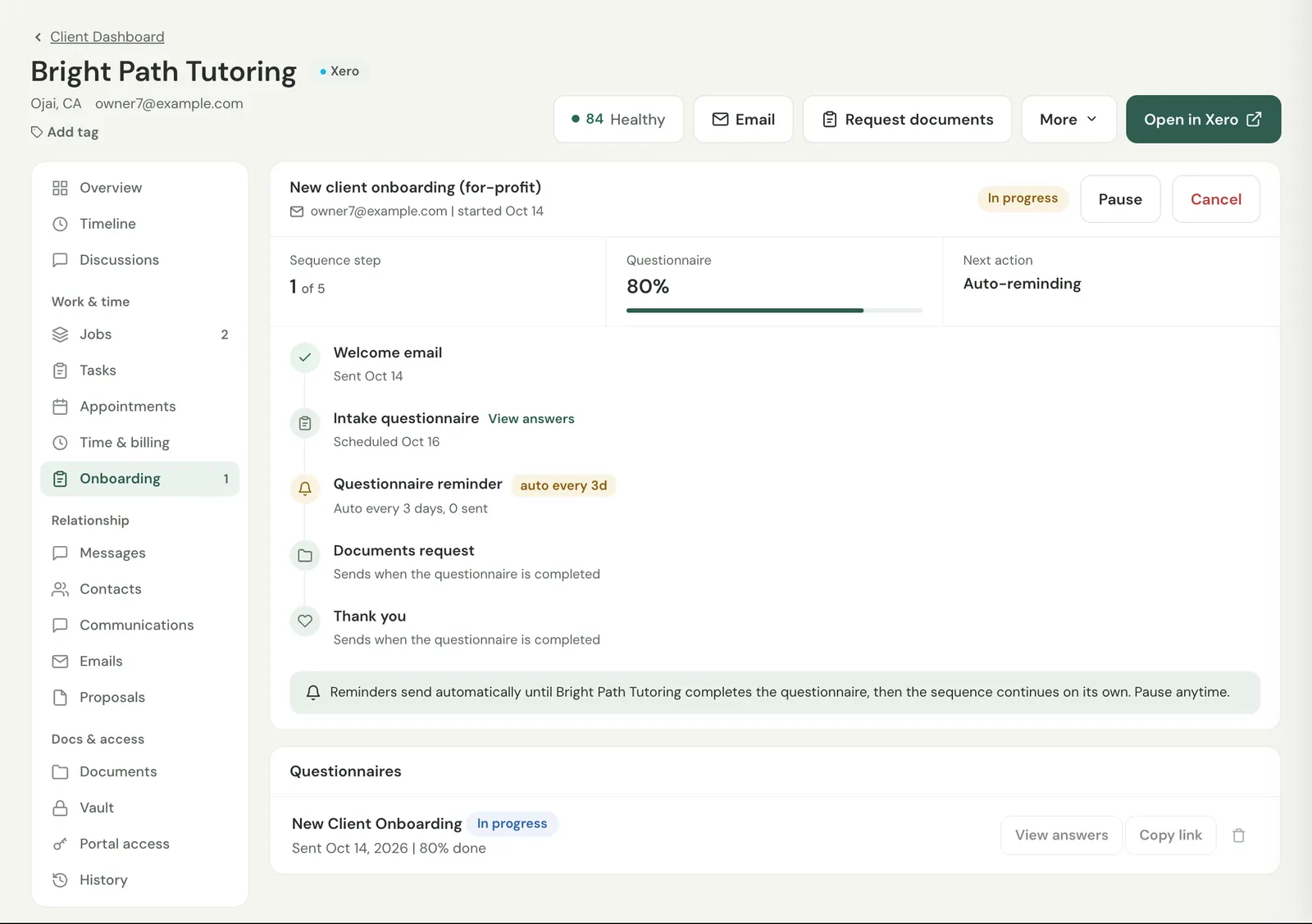
Build a sequence once: welcome email, questionnaire, documents, reminders
What you get
A first month that feels organized to your client.
Questionnaire builder
Build your own sections and questions, or start from our default template.
Onboarding sequences
Chain steps together: questionnaire, document request and emails.
Reminders that stop
Automatic nudges that end as soon as the step is done.
Real document requests
Document steps create tracked requests with an upload link.
Answers on the client record
Everything the client tells you is saved where your team will look.
Your brand throughout
Your logo and colors on every email and page.
Send just a questionnaire
Send one questionnaire on its own, and send a reminder with one click.
A closer look
How onboarding works in Bliss HQ.
Questionnaire builder
Ask exactly what you need, in plain sections.
Group questions into sections with your own help text, and mark the ones that must be answered. Two ready-made templates get you started: New Client Onboarding with 10 sections and 67 questions, and a Clean-Up or Catch-Up project with 6 sections and 38 questions.
- 9 answer types, from short text and dates to yes or no
- Multiple-choice questions can offer an Other box
- Required questions are checked before the client can submit
- Duplicate any template to make a version for a niche
- Print the answers from the client's record
What your client sees
One link, one section at a time.
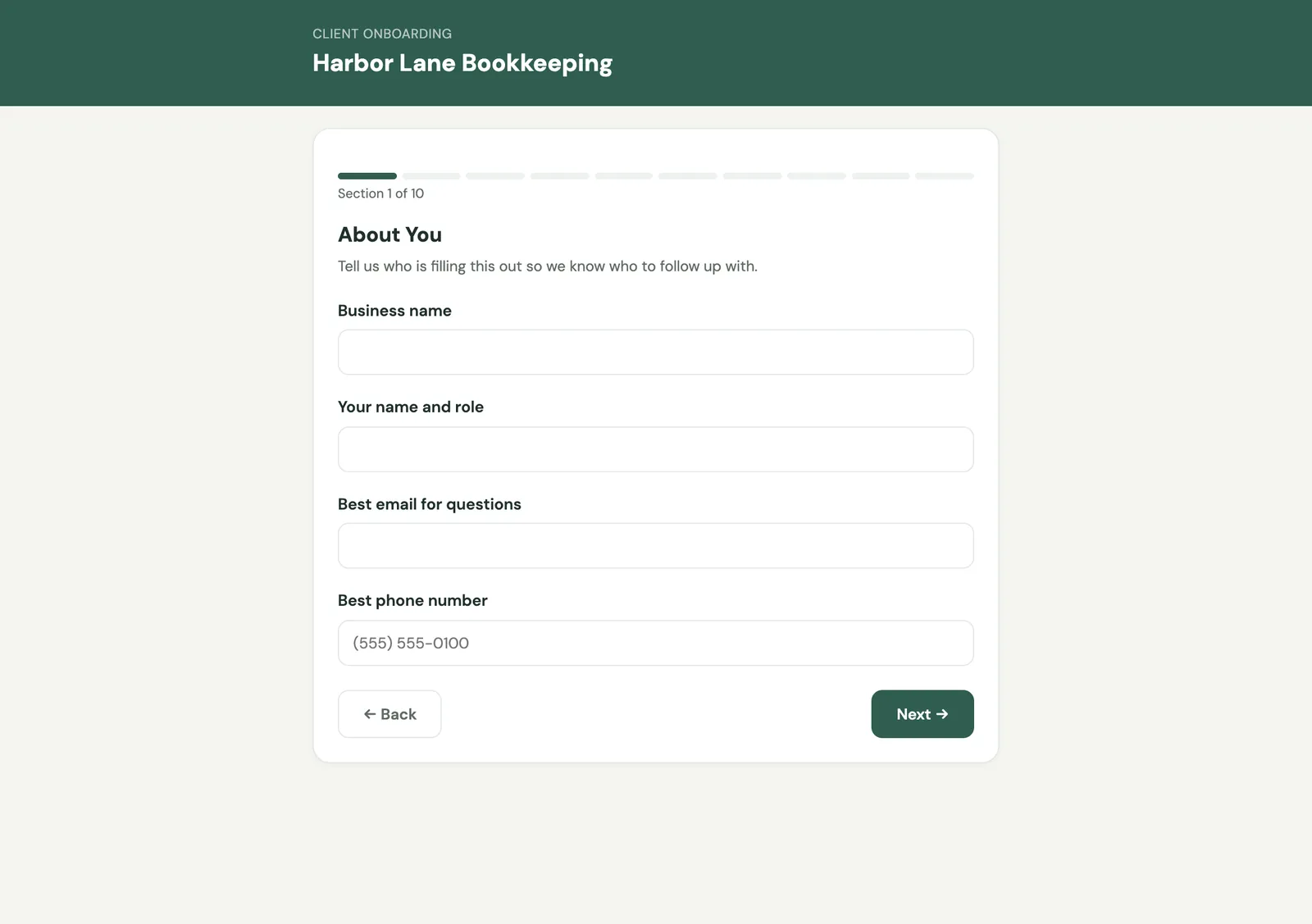
Clients open a branded page with no login and work through it a section at a time. Answers save as they go, so they can close the page and come back to the same link later.
- Section by section with a clear progress count
- Autosaves, and retries if the connection drops
- Reminds clients not to enter passwords or full account numbers
- Also listed in their client portal to-do list
- Links stay open for 60 days, or 90 when sent by a sequence
Sequences that wait
Steps that start when the client is ready.
A sequence mixes welcome, questionnaire, document request, reminder, thank-you and team task steps. Each step runs on a set day or waits until the questionnaire is finished, so nothing goes out of order.
- Schedule steps by day, like day 0 welcome and day 3 documents
- After-questionnaire steps fire the moment the client submits
- Reminders repeat on your interval and stop once it is finished
- Team task steps alert owners and admins to act
- Pause, resume or cancel any client's sequence
Nothing slips
You see every step, opened, done or stuck.
The client's Onboarding tab shows each step with when it was sent and opened. If an email bounces or fails, the step is marked failed with the reason, and a send that fails outright alerts your team.
- Document steps create a tracked request with an upload link
- Upload links stay open for 14 days, with automatic reminders
- Emails that can't be sent alert the sender and firm admins
- Completed questionnaires notify your team in Bliss HQ and Slack
- Completed questionnaires can trigger your Zapier or webhook automations
How it works
Three steps, then it runs.
Build a sequence
Add steps and pick a questionnaire, starting from our template if you like.
Send it
The client gets one branded link, no account needed.
Watch it finish
Track every step on the client's Onboarding tab while reminders do the chasing.
Part of one system
Connected to the rest of your firm.
Onboarding can start on its own when a proposal is signed, pulls in contacts from the client record and hands documents to the client portal.
Questions about onboarding
Do reminders really stop?
Yes. Each reminder checks whether the step is finished before it sends.
Can I start from a template?
Yes. There is a ready-made New Client Onboarding template you can edit.
Does the client need a login?
No. They use a secure link. They can also use the client portal if you invite them.
What question types can I use?
Short text, paragraph, single choice, multiple choice, yes or no, email, phone, date and number. Choice questions can include an Other box.
Can the client stop halfway and come back?
Yes. Answers save automatically, and the same link reopens where they left off.
What happens the moment a client submits?
Your team is notified and any steps waiting on the questionnaire, like the document request and thank-you email, go out right away.
What if an onboarding email bounces?
The step is marked as failed on the client's Onboarding tab with the reason. If the email can't be sent at all, the sender and firm admins also get a notice.
Can onboarding start automatically when we win a client?
Yes. Add Start an onboarding sequence to your Won stage and it begins as soon as the lead becomes a client.
Try onboarding on your own clients.
30 days free, no card. Every feature included, with unlimited staff.