 Bliss HQ
Bookkeeping review
Find what is wrong in the books before your client does.
Review runs 20 checks on each client's month in QuickBooks Online or Xero, from uncoded transactions to bank reconciliations and balance sheet changes. Fix and code right on the page, ask the client about the rest, then sign the month off.
For QuickBooks Online and Xero clients.
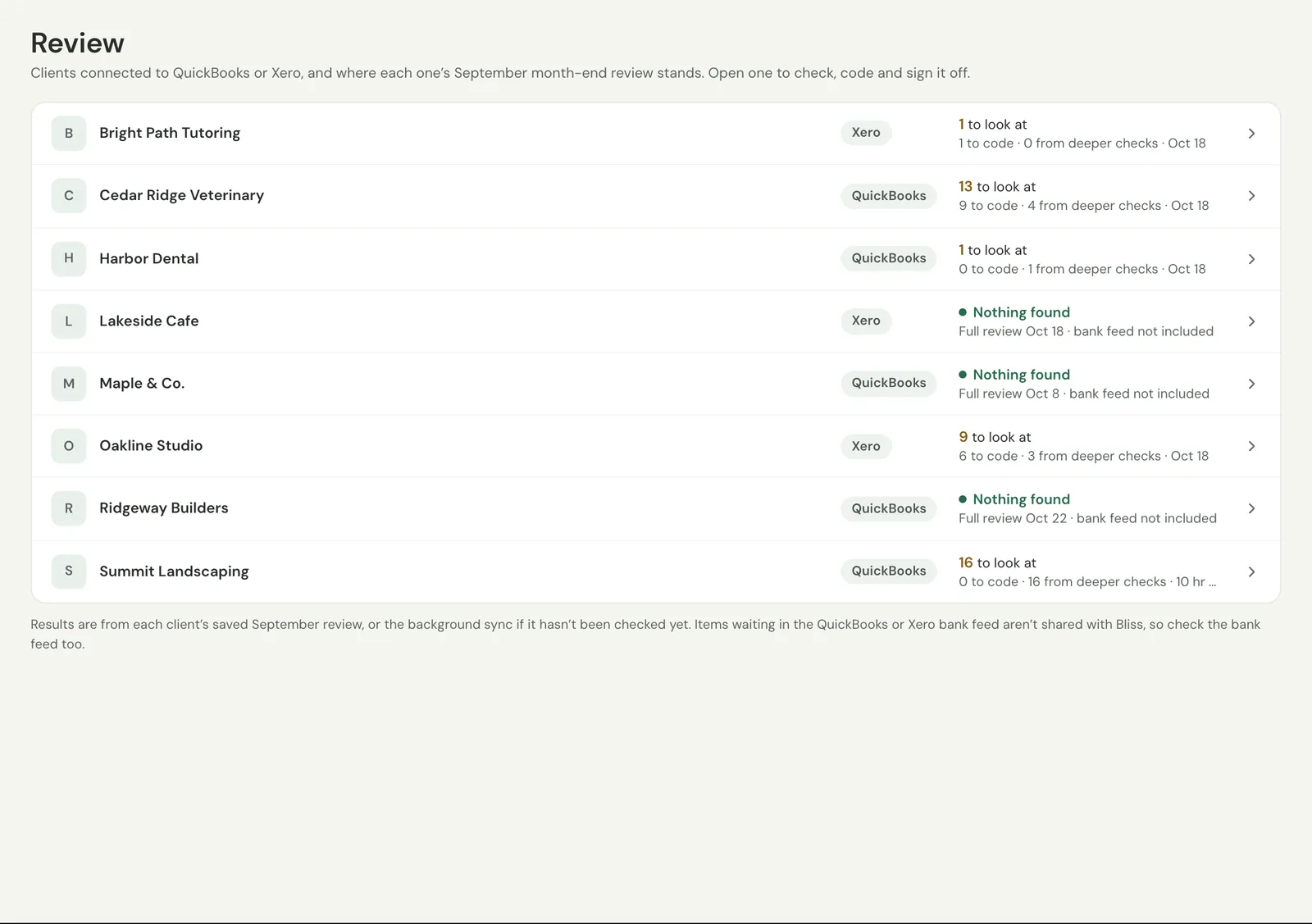
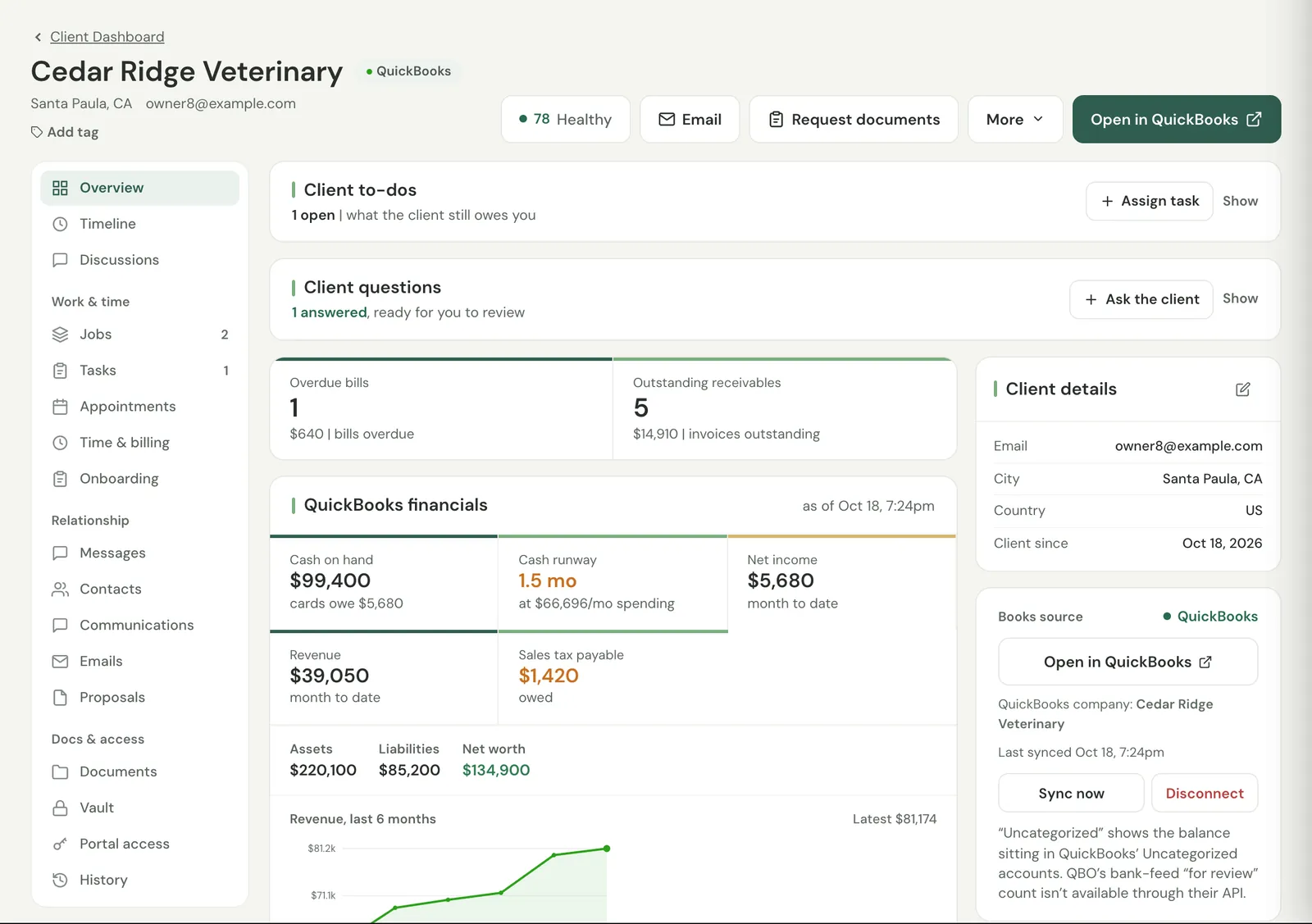
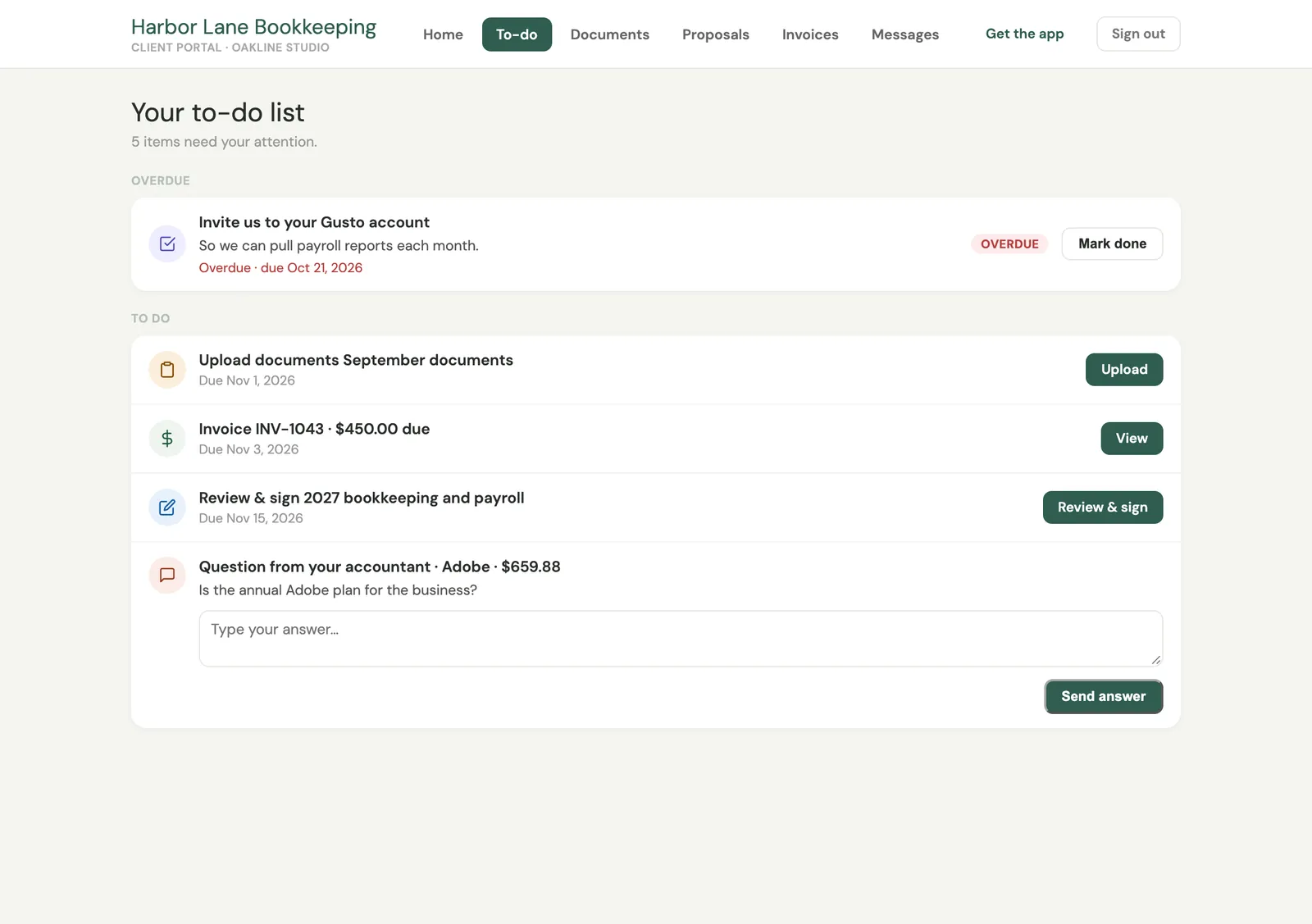
Every QuickBooks and Xero client, with where each month-end review stands
What you get
A second pair of eyes on every file, every month.
20 checks every month
Coding, bank recs, balance sheet changes, tie-outs, new vendors, receipts and more.
Month-end and Full cleanup
A saved monthly checklist, or a deep scan of the whole ledger.
Suggested coding
Bliss AI suggests an account for each uncoded item, from the client's own chart.
Write back after approval
Approved coding is saved to QuickBooks or Xero for you.
Ask the client
Bliss AI drafts the question. Their answer comes back onto the row.
Coding and ignore rules
Code a payee the same way every month, or stop flagging what is fine.
Tuned per client
Switch checks off and set your own thresholds for each client.
Explain the changes
Bliss AI suggests why each balance sheet change and swing happened.
Sign-off and score
Sign the month off, with an optional second reviewer, and get a 0 to 100 review score.
A closer look
How bookkeeping review works in Bliss HQ.
Month-end checklist
Twenty checks, worked top to bottom, every month.
Pick a month and Bliss HQ reads it from QuickBooks Online or Xero into a saved checklist, with a progress panel while it works. The saved check opens instantly next time, and Check again pulls fresh numbers.
- Coding: needs coding, possibly miscoded, duplicates, missing payee, missing class
- Coded to a parent account, or a class or tax code that isn't the usual one
- Large transactions, possibly personal spending, deposits that may be invoice payments
- Bank recs, balance sheet, payroll and loan tie-outs, and balance sheet changes since last month
- Receivables and payables, new vendors and accounts, duplicate contacts, closed periods, month vs normal, receipts
Code in place
Code it here and it posts to the books.
Choose an account, payee and class right on the row, or ask Bliss AI to suggest accounts for up to 40 transactions at a time from the client's own chart of accounts. Each suggestion shows high, medium or low confidence and a short reason, and nothing posts until someone clicks Post.
- When the client has answered a question, Bliss AI uses their answer
- Post up to 100 transactions to QuickBooks or Xero at once
- Every change is logged with the old and new value
- Won't overwrite coding someone changed in the books since the check
- Only staff allowed to change client books can post
Tuned per client
Teach it once, and it remembers.
Coding rules fill in the account and class for a payee every month. Ignore rules stop flagging a payee, description or account you know is fine. Each client can also switch checks off and set its own thresholds.
- Large transactions from $2,500, receipts from $75, balance changes from $5,000, all adjustable
- Payroll liabilities that aren't being paid down, and loans tied to the lender's statement
- Leave a note on any item so the next person knows why it is fine
- Bliss AI suggests why each balance sheet change and swing happened
- See how many times each rule has been used, and delete it any time
Ask and sign off
Ask, chase, then sign the month off.
Select transactions and Bliss AI drafts one short, friendly question for each, naming the payee, amount and date. Answers come back onto the row ready to code, and once the month is over you sign it off with an optional note.
- Questions land in the client's portal to-do list, with a one-click reminder
- Two-step sign-off: a reviewer approves the month or sends it back
- A 0 to 100 review score for the month, which feeds the client's health score
- Save the month's review as a PDF or spreadsheet for the client file
- Signed-off months close the client on Monthly close
How it works
Three steps, then it runs.
Connect
Link the client's QuickBooks Online or Xero.
Check
Open the month and see every issue, grouped and counted.
Fix and sign off
Code it, ask the client or note why it is fine, then sign the month off.
Part of one system
Connected to the rest of your firm.
Signed-off months close the client on Monthly close, the review score feeds the client's health score, client questions appear in the portal to-do list, and deeper problems become a Books Cleanup project.
Questions about bookkeeping review
Does it change the books on its own?
No. Nothing is written back until a person approves it.
Does it work with Xero and QuickBooks?
Yes, both QuickBooks Online and Xero.
What does the client see when I ask a question?
A short question with the transaction details in their portal to-do list, answered in one box.
Will it tell me if someone changes a month I already closed?
Yes. The Closed periods check lists transactions dated on or before your QuickBooks closing date, Xero lock date or last signed-off month that were added or changed since, and Monthly close checks closed months every night.
Can I review an earlier month?
Yes. The month picker covers this month and the 12 before it, showing which months are signed off and how many items each still has open.
Can I undo a sign-off?
Yes. Take back removes it. Both the sign-off and the undo are recorded in your firm's activity log.
Which clients should I review first?
The Review list puts connection problems and checks that couldn't run first, then the clients with the most open items, then those not checked yet. Signed-off clients go last.
Does Bliss AI see the whole file?
Only what a feature needs, like the transactions you ask it to code or the month's balance changes. It only suggests, a person posts, and our AI provider doesn't train on your data.
Try bookkeeping review on your own clients.
30 days free, no card. Every feature included, with unlimited staff.